At the end of the month, your total spending looks about right, so you assume the budget held.
Then you look closer and find that groceries ran well over, while a quiet month for transport covered it up.
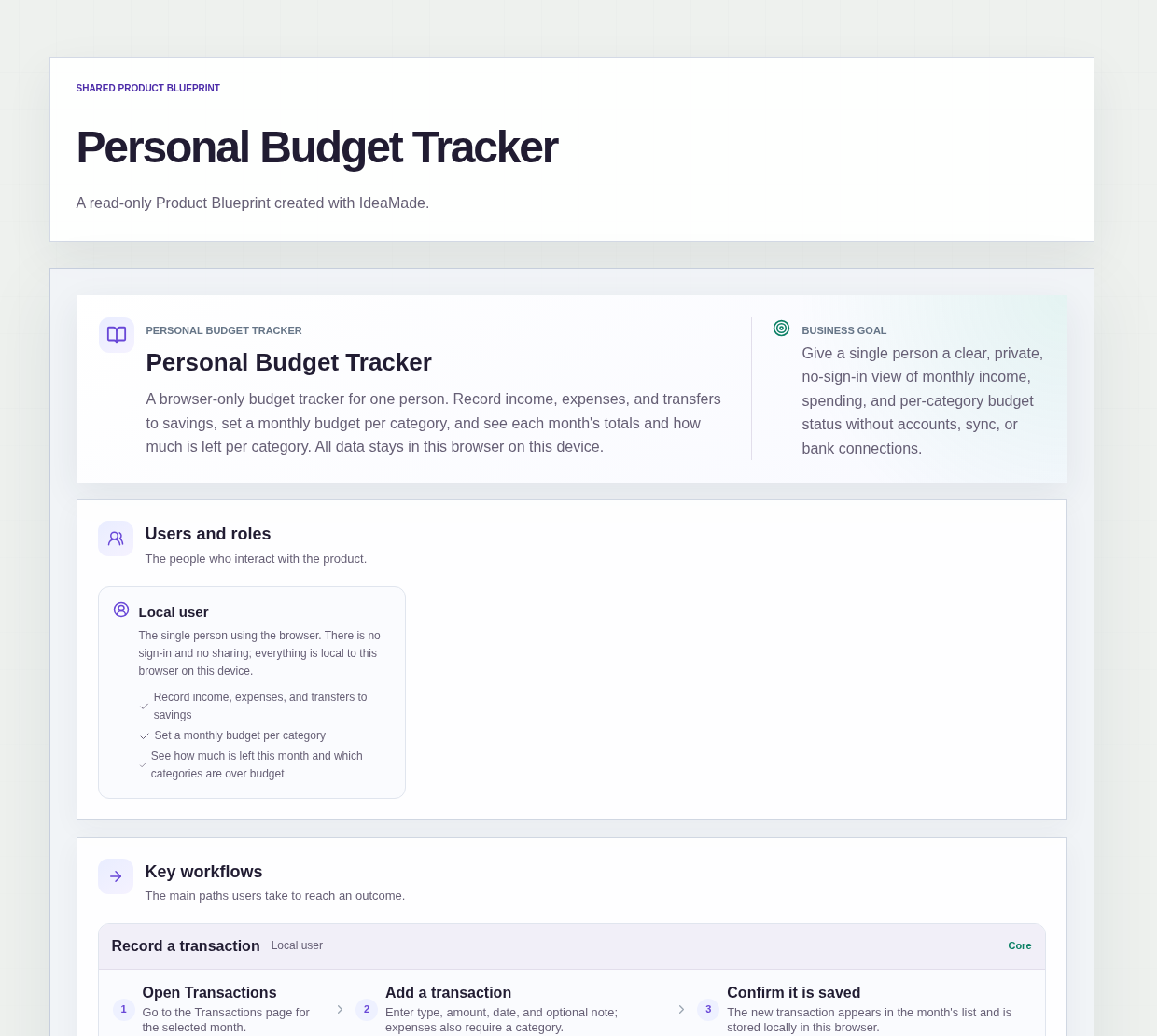
This sample blueprint is a personal budget tracker that runs in the browser: you set a monthly budget for each category, record what comes in and goes out, and the month overview shows what is left per category, with any category over its budget in red.
Who this is for
- People who want to track income and expenses their own way, by their own categories
- Freelancers who want a simple monthly view of what came in and what was spent
- Anyone who wants a budget tracker with no sign-up and no account to create
- People who keep a budget in a spreadsheet and want the per-category sums done for them
Sample blueprint, read-only. Open it with no sign-in. Select "Build this app with IdeaMade" at the bottom to open it in the blueprint editor, where you can change it and continue.
Building the app requires signing in.
The sample is a browser tool for one person, working in one browser on one device.
There is no account and no sign-in: all three pages are public.
All data stays only in this browser on this device.
The single role is the Local user, who records income, expenses and transfers to savings, sets a monthly budget per category, and checks how much is left this month.
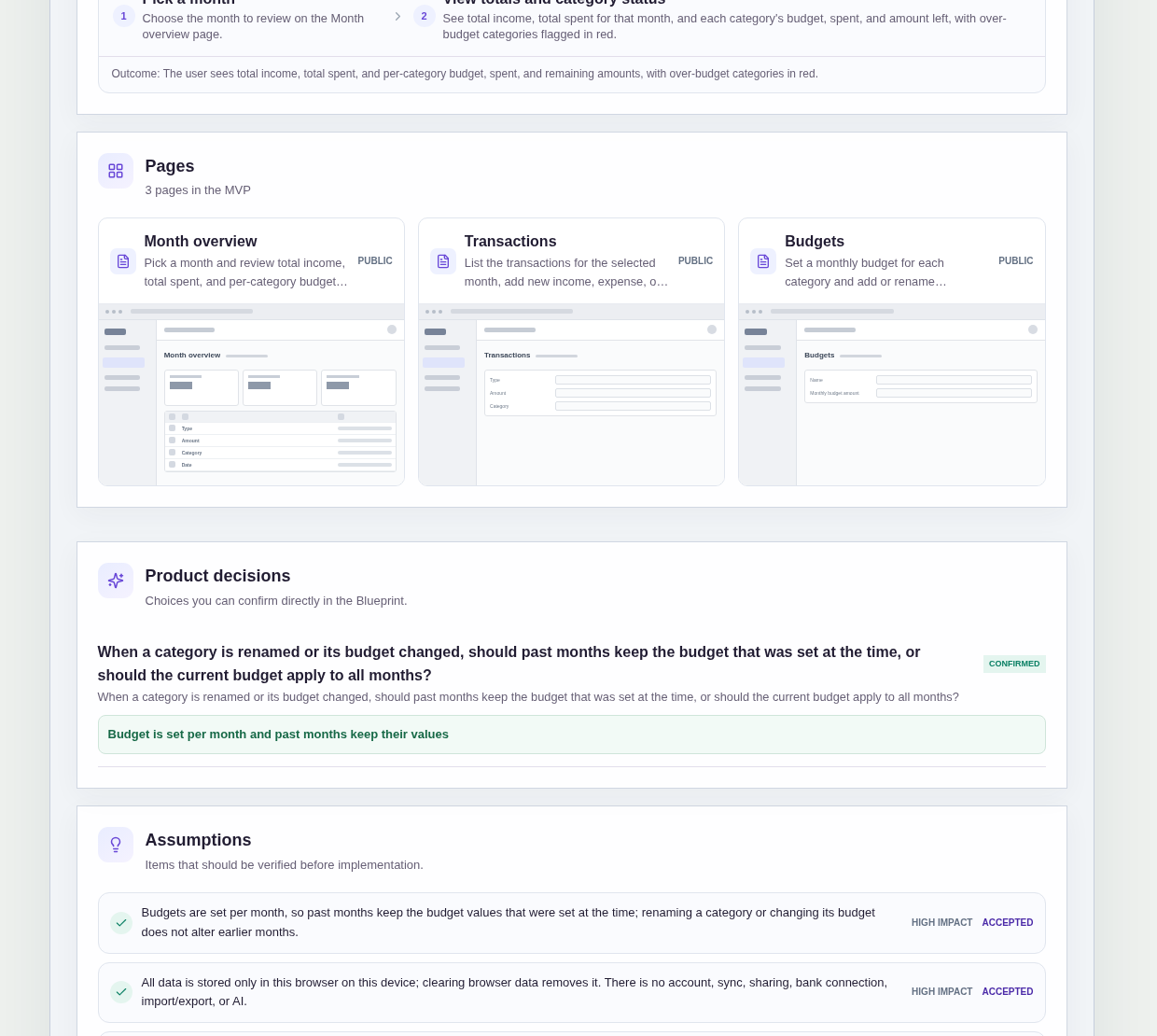
It has three pages:
- Month overview: pick a month and see total income, total spent, and each category's budget, amount spent and amount left, with over-budget categories in red; when there is no data yet, it points you to Budgets and Transactions
- Transactions: the transactions for the selected month, where you add income, expense or transfer-to-savings transactions and delete existing ones; an empty list invites you to add the first one
- Budgets: add or rename categories, such as Rent, Groceries, Transport or Fun, and set a monthly budget for each; with no categories yet, it invites you to add the first one
A transaction has a type, an amount, a date and an optional note, and an expense also has a category.
A category has a name and a monthly budget amount.
Sample data.
Tracking a budget by hand tends to slip in a few familiar ways.
An expense is noted without a category, so it never counts against any budget.
One category runs over, but the monthly total still looks fine, so nobody notices.
A budget is changed this month, and last month's numbers quietly change with it.
The rules below keep every expense counted in the right place and every month readable later.
Example scenario: at the start of the month, you open Budgets and set monthly amounts for Rent, Groceries, Transport and Fun. Over the month, you add each grocery shop on Transactions as an expense with the Groceries category and its date. At month end, the Month overview shows Groceries in red because spending passed its budget, even though total spent looks reasonable.
Here is how the app is set up.
Every expense needs a category.
When you add an expense, you enter its amount, date and category, with a note if you want one.
That prevents spending that sits outside every budget and makes a category look healthier than it is.
Each category has its own monthly budget.
On the Budgets page, you set a monthly budget amount for each category.
The Month overview then shows each category's budget, amount spent and amount left side by side.
That answers "how much can I still spend on groceries?" without adding anything up yourself.
Over-budget categories are shown in red.
On the Month overview, any category whose spending passes its budget is flagged in red.
That prevents one overspent category from hiding behind a total that looks fine.
Budgets are set per month, and past months keep their values.
This was a confirmed product decision in the sample.
Renaming a category or changing its budget does not alter earlier months.
That prevents a budget change today from rewriting what last month's overview said.
You review one month at a time.
The Month overview and Transactions both work on a selected month.
Pick a month to see its total income, total spent and the status of every category, and to see that month's transactions.
Amounts use a single currency.
In the sample, there is no currency selection; the blueprint lists this as an accepted assumption for the first version.
Data stays only in this browser on this device.
Your transactions, categories and budgets are stored locally in the browser you use.
Clearing browser data removes them, and another browser or device will not show them.
The sample has no account, sync, sharing, bank connection, or import and export.
How do I see how much is left in each budget category this month?
Give each category a monthly budget, and record every expense with a category and a date.
In this sample, the Month overview shows each category's budget, amount spent and amount left for the month you pick, alongside total income and total spent.
Categories that are over budget are shown in red, so overspending in one category stands out even when the total looks fine.
Is there a personal budget tracker with no sign-up?
This sample is a browser tool with no account and no sign-in, and all three pages are public.
Everything you enter stays only in this browser on this device.
That keeps it private, but clearing browser data removes it, and another browser or device will not show it.
There is no sync, sharing, bank connection, or import and export, so treat this browser as the only copy.
What happens to past months when I change a category budget?
In this sample, past months keep the budget that was set at the time.
Budgets are set per month, and this was a confirmed product decision.
Renaming a category or changing its budget does not alter earlier months, so an old Month overview still shows the budget, spent and left amounts as they were.
That lets you compare months honestly after you adjust a budget.
Can I build my own budget tracker app without coding?
Yes, for a simple browser tool like this one.
With IdeaMade, you describe your categories, what a transaction records, how the month overview should add up and where data is stored, in plain language.
IdeaMade turns that into a blueprint you can review and change before anything is built.
Then you build the app, preview it with test transactions, and check the numbers before you rely on it.
Copy this prompt, change the parts in brackets, and paste it into the blueprint generator:
Build a browser-based personal budget tracker for [one person tracking their own spending]. No sign-in; all data is stored only in this browser on this device. Pages: Month overview (pick a month; total income, total spent, and each category's budget, spent and amount left, with over-budget categories in red), Transactions (list for the selected month, add and delete a transaction) and Budgets (add and rename categories such as [Rent, Groceries, Transport, Fun] and set a monthly budget for each). A transaction has a type, amount, date and optional note; expenses also need a category. Budgets are set per month, and past months keep their values. Use a single currency. Do not add [accounts, sync, sharing, bank connections, or import and export].
Your idea, made real.