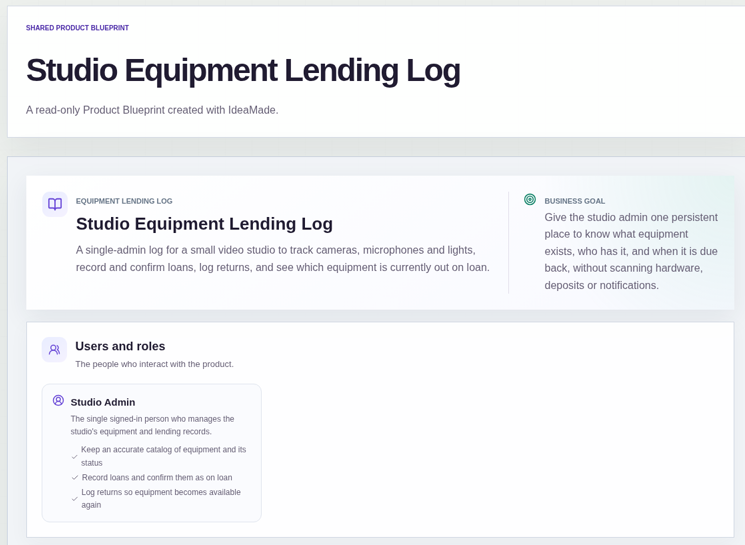
When a studio shares cameras, microphones and lights, a paper sign-out sheet or a shared spreadsheet is usually where the trouble starts: nobody is sure who has the second light kit or when it is due back.
This sample blueprint is an equipment lending log for a small video studio: an equipment list, loans that an admin confirms, returns, and a view of everything still out.
Who this is for
- Small video, photo or design studios that share gear between a few people
- Shared offices, clubs and small teams that lend out equipment
- Anyone who has outgrown a sign-out sheet but does not need scanners or hardware
Sample blueprint, read-only. Open it with no sign-in. Select "Build this app with IdeaMade" at the bottom to open it in the blueprint editor, where you can change it and continue.
Building the app requires signing in.
The sample is a single-admin log.
One signed-in studio admin keeps the equipment list, records loans and logs returns.
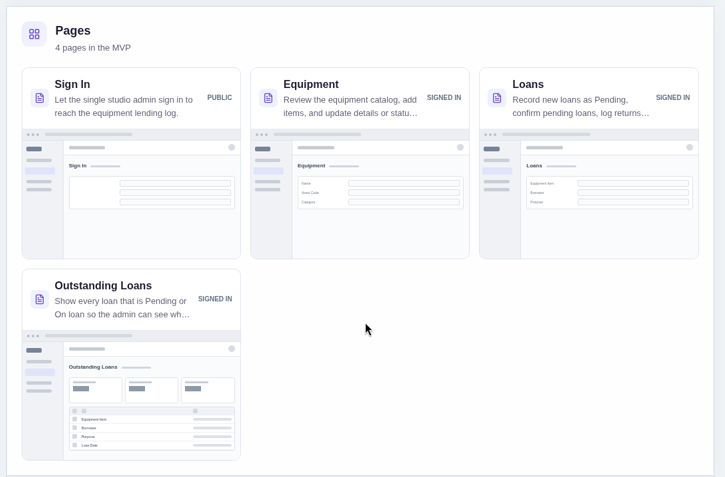
It has four pages:
- Sign in: so only the admin can reach the lending log
- Equipment: the equipment list, where the admin adds items and updates details or status, such as Maintenance
- Loans: where the admin records a loan, confirms it and logs the return
- Outstanding loans: every loan that is Pending or On loan, so you can see what is out
An equipment item has a name, an asset code, a category and a status: Available, On loan or Maintenance.
A loan has the item, a borrower, a purpose, a loan date, an expected return date and a status: Pending, On loan or Returned.
Sample data.
Without a lending log, a small studio runs into the same few problems.
Two people expect the same camera on the same afternoon.
Nobody can say who has the microphone kit.
A returned item is never marked as back, so it looks unavailable.
The rules below keep each item's status in step with its loans.
Example scenario: a freelancer borrows a camera and a light kit for a weekend shoot. The admin picks the camera, enters the borrower, the purpose, the loan date and the expected return date, and saves the loan.
Here is how the app is set up.
A new loan starts as Pending, and the admin confirms it.
This was a confirmed product decision in the sample.
The admin records the loan first, then confirms it, so a loan only counts as out once someone has said it is.
Borrowers do not submit loans themselves.
You can only lend an item that is available.
When the admin records a loan, they choose an available item.
That keeps the same camera from being promised twice.
Confirming a loan sets the item to On loan.
This was also a confirmed decision: equipment status follows loans automatically.
The list always shows which items are out, without the admin editing the status twice.
Logging a return sets the item back to Available.
The admin finds the On loan record and logs its return.
The loan becomes Returned and the item is ready for the next person.
Maintenance is set by hand.
The admin marks an item as Maintenance when it is being repaired or serviced.
Loans do not change that status on their own.
One list shows everything still out.
The outstanding loans page lists every loan that is Pending or On loan, with the due date.
When nothing is out, it says so.
One admin runs the log.
There are no borrower accounts and no other roles in this sample.
What should an equipment checkout app include?
An equipment checkout app should include an equipment list, a way to record who borrowed what and when it is due back, and a way to log the return.
Each item needs a status such as Available, On loan or Maintenance.
A list of loans that are still out shows what needs chasing.
How do I replace a sign-out sheet for shared equipment?
Replace it with an equipment list and a loan record for each checkout.
Record the item, borrower, purpose, loan date and expected return date, confirm the loan, then log the return when the gear comes back.
The status of each item then shows at a glance whether it is free.
Does this equipment lending log use QR codes or scanners?
No.
This sample works by hand: the admin records loans and returns on screen.
It does not include scanning, deposits, messages or notifications, so it suits a small team that wants a simple lending log.
Can I build my own equipment lending app without coding?
Yes, for a simple internal log.
With IdeaMade, you describe your equipment, loan statuses and who confirms loans in plain language.
IdeaMade turns that into a blueprint you can review and change before anything is built.
Then you build the app, preview it, and check the rules before your team relies on it.
Copy this prompt, change the parts in brackets, and paste it into the blueprint generator:
Build an equipment lending log for [a small video studio sharing cameras, microphones and lights]. Equipment has a name, asset code, category and a status of Available, On loan or Maintenance. Loans have the item, borrower, purpose, loan date, expected return date and a status of Pending, On loan or Returned. One admin confirms loans and logs returns. Show a list of outstanding loans. One signed-in admin. No scanning, deposits or notifications.