It is mid-December and you are not sure whether you already bought something for your nephew, or how far over budget your sister's gifts have gone.
Last year's list is in an old notes app, so you cannot check whether the scarf you just picked out is the same one you gave her two years ago.
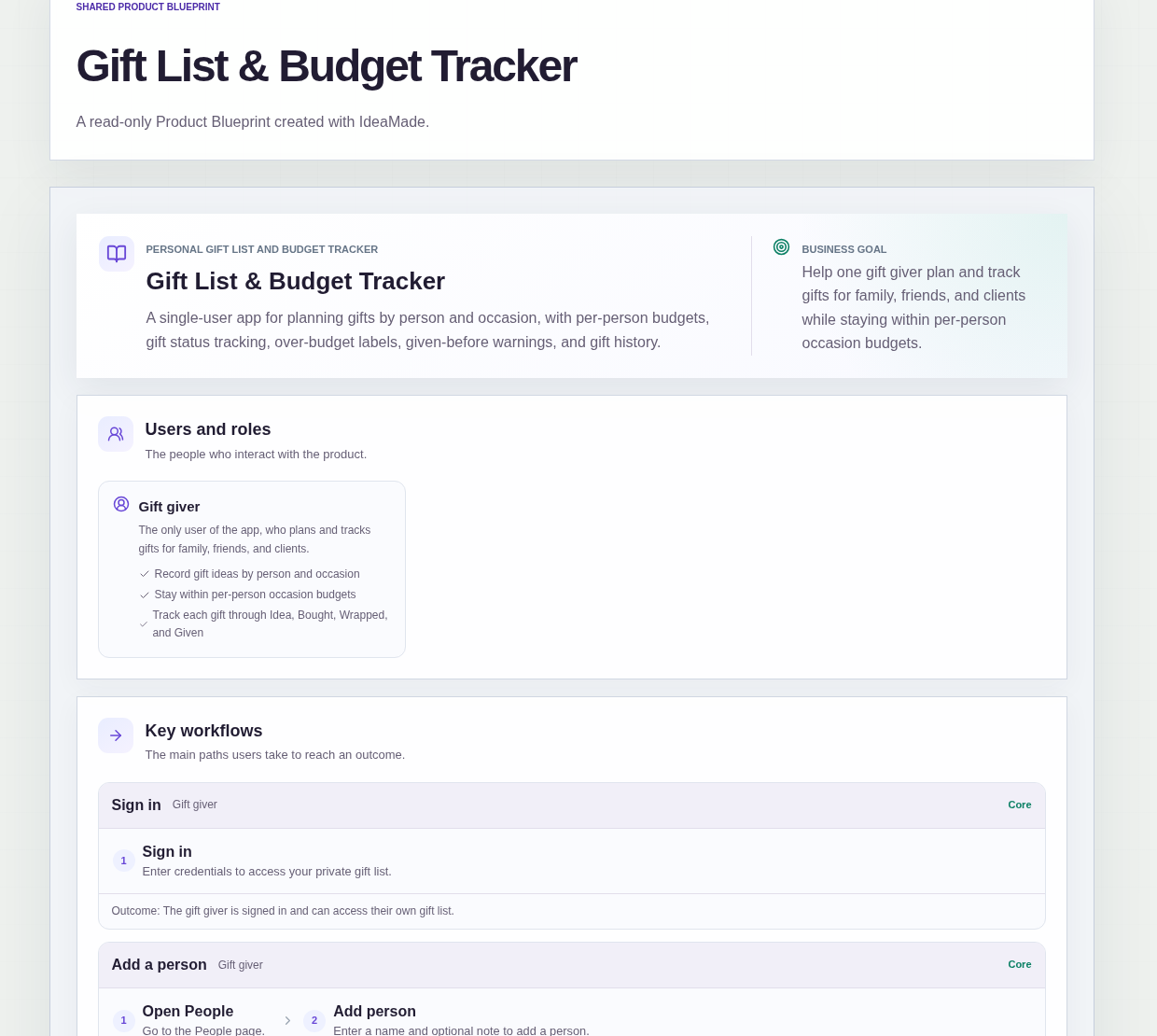
This sample blueprint is a private gift tracker app: every gift belongs to a person and an occasion with a budget, moves through clear statuses, and shows a warning when the plan goes over budget.
Who this is for
- Parents buying holiday gifts for a whole family
- Freelancers and small business owners who give gifts to clients
- Anyone who sets a budget per person for birthdays or holidays
- People who split the cost of some gifts with a partner or siblings
Sample blueprint, read-only. Open it with no sign-in. Select "Build this app with IdeaMade" at the bottom to open it in the blueprint editor, where you can change it and continue.
Building the app requires signing in.
The sample is a single-user app for the gift giver, who signs in to use it.
There is one role:
- Gift giver: the only user, who plans and tracks gifts for family, friends and clients
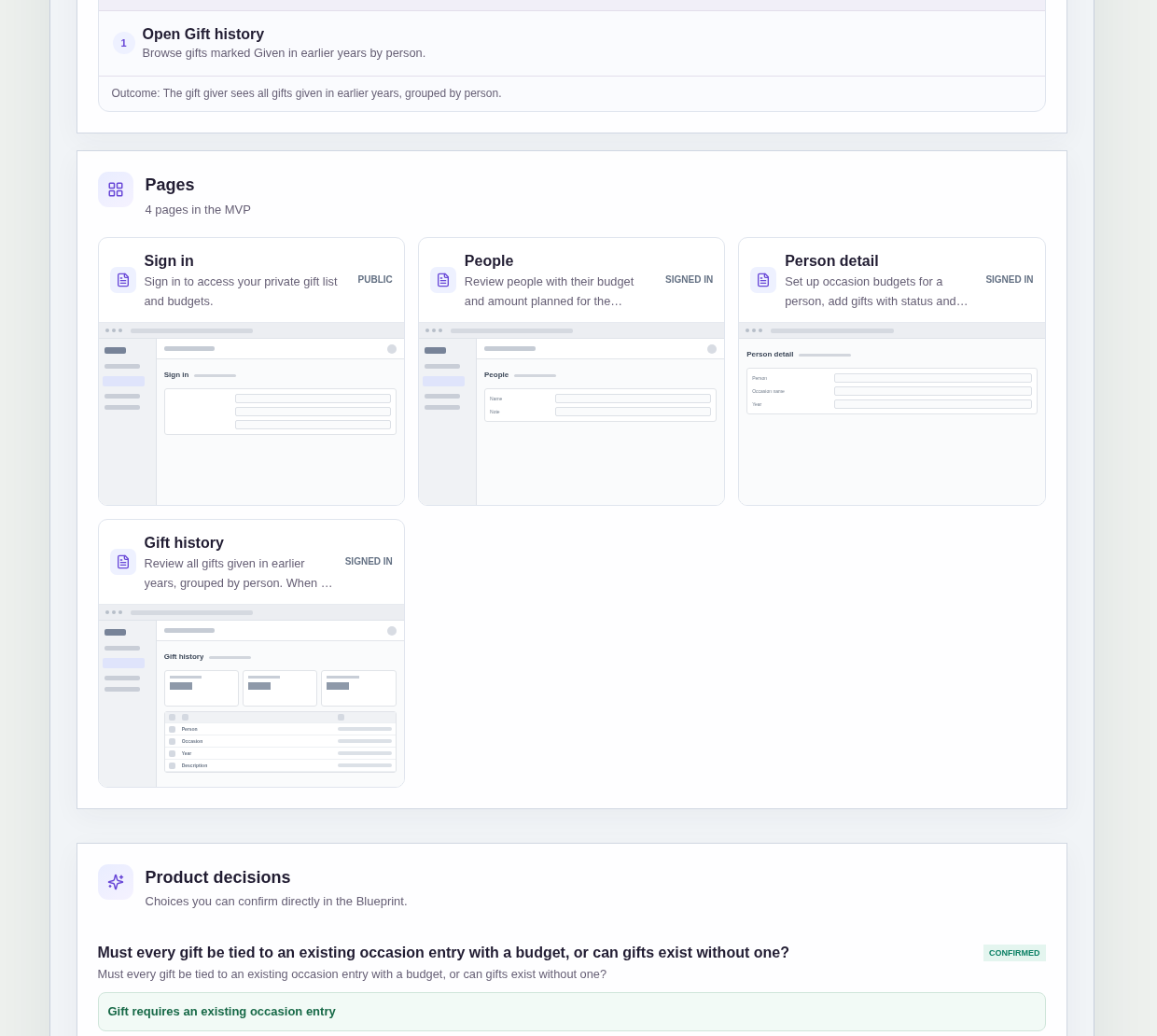
It has four pages:
- Sign in: so the gift list and budgets stay private
- People: everyone on the list with their budget and planned amount for the selected occasion, and a way to add a person
- Person detail: one person's occasion budgets and gifts, with status, price and any warnings
- Gift history: gifts marked Given in earlier years, grouped by person
A person has a name and an optional note.
An occasion entry for a person holds the occasion name, the year and a budget amount.
A gift holds a description, your share of the price, a status and a note.
Gift statuses are Idea, Bought, Wrapped and Given.
Sample data.
A gift list kept in notes tends to fail in the same ways every year.
Gifts get bought with no budget in mind, so the total only becomes clear after the shopping is done.
Nobody remembers whether a gift is still an idea, already bought or already wrapped.
A shared gift gets counted at full price, and the budget looks blown when it is not.
The rules below give each gift one place and let the budget follow from it.
Here is how the app is set up.
Every gift belongs to an occasion with a budget.
This was a confirmed product decision in the sample.
The gift giver sets up an occasion entry for a person first, with the occasion name, year and budget, and only then adds gifts under it.
That prevents gifts that float around with no budget to measure them against.
Statuses move forward in order.
A gift goes from Idea to Bought to Wrapped to Given, one step at a time.
That prevents a gift from jumping to Given while nobody knows whether it was actually bought or wrapped.
A price is required before a gift can be marked Bought.
A gift cannot reach Bought without your share of the price.
That prevents bought gifts with no cost, which would make the planned total look lower than it really is.
A gift cannot be edited after it is Given.
Once a gift is marked Given, it stays as it was.
That keeps Gift history a reliable record of what each person actually received.
An Over budget label appears when the plan goes over.
When the planned total for a person's occasion is higher than its budget, the person is labelled Over budget.
The gift can still be saved, so the gift giver decides whether to change the plan or accept going over.
A Given before warning flags possible repeats.
When a new gift looks like one already given to the same person in an earlier year, the app shows a Given before warning.
The gift can still be saved, but the gift giver sees the possible repeat before buying it.
The price is only your share of a shared gift.
The price field holds only the gift giver's own share, and budget totals count only that share.
That prevents a gift split with siblings from making a budget look exceeded when it is not.
Example scenario: a parent adds their sister with a holiday occasion for this year and a budget. They add a gift idea, then mark it Bought after entering their share of the price. A second gift pushes the planned total past the budget, and the People page shows her as Over budget.
The app is private to one signed-in gift giver, with no sharing, reminders, AI suggestions, imports or file uploads.
How do I keep a holiday gift list with a budget per person?
Give each person an occasion entry with its own budget, and add every gift under it.
In this sample, the gift giver sets the occasion name, year and budget for each person before adding gifts.
The People page shows each person's budget and planned amount for the selected occasion, and an Over budget label appears when the planned total is higher than the budget.
How can I avoid giving someone the same gift twice?
Keep a history of gifts marked Given and check new ideas against it.
In this sample, the Gift history page lists gifts given in earlier years, grouped by person.
When a new gift looks like one already given to the same person in an earlier year, the app shows a Given before warning.
The gift can still be saved, so the final choice stays with you.
How do I track a gift I am splitting with someone else?
Record only your own share of the price.
In this sample, the price field holds only the gift giver's share of a shared gift, and budget totals count only that share.
That way a gift split with a partner or siblings counts fairly against your budget for that person, and the Over budget label reflects what you are actually spending.
Can I build a gift tracker app without coding?
Yes, for a private gift list that only you use.
With IdeaMade, you describe your people, occasions, budgets, gifts and rules in plain language.
IdeaMade turns that into a blueprint you can review and change before anything is built.
Then you build the app, preview it with test people and gifts, and check the budget rules before you rely on it.
Copy this prompt, change the parts in brackets, and paste it into the blueprint generator:
Build a private gift tracker app for [a parent buying holiday gifts for the whole family]. The gift giver is the only user and signs in. Pages: Sign in; People (each person with their budget and planned amount for the selected occasion); Person detail (occasion entries and gifts); Gift history (gifts given in earlier years, grouped by person). A person has a name and an optional note. An occasion entry has an occasion name such as [Christmas], a year and a budget amount. Every gift belongs to an occasion entry. A gift has a description, my share of the price, a status and a note. Statuses are Idea, Bought, Wrapped and Given, in order. A price is required before Bought, and no edits after Given. Show an Over budget label when the planned total exceeds the budget, and a Given before warning for a possible repeat gift; both still allow saving. No sharing, reminders, imports or file uploads.
Your idea, made real.