The caterer needs a final number by Friday.
The replies are spread across three chat threads, a shoebox of paper cards and an aunt who has been keeping her own count.
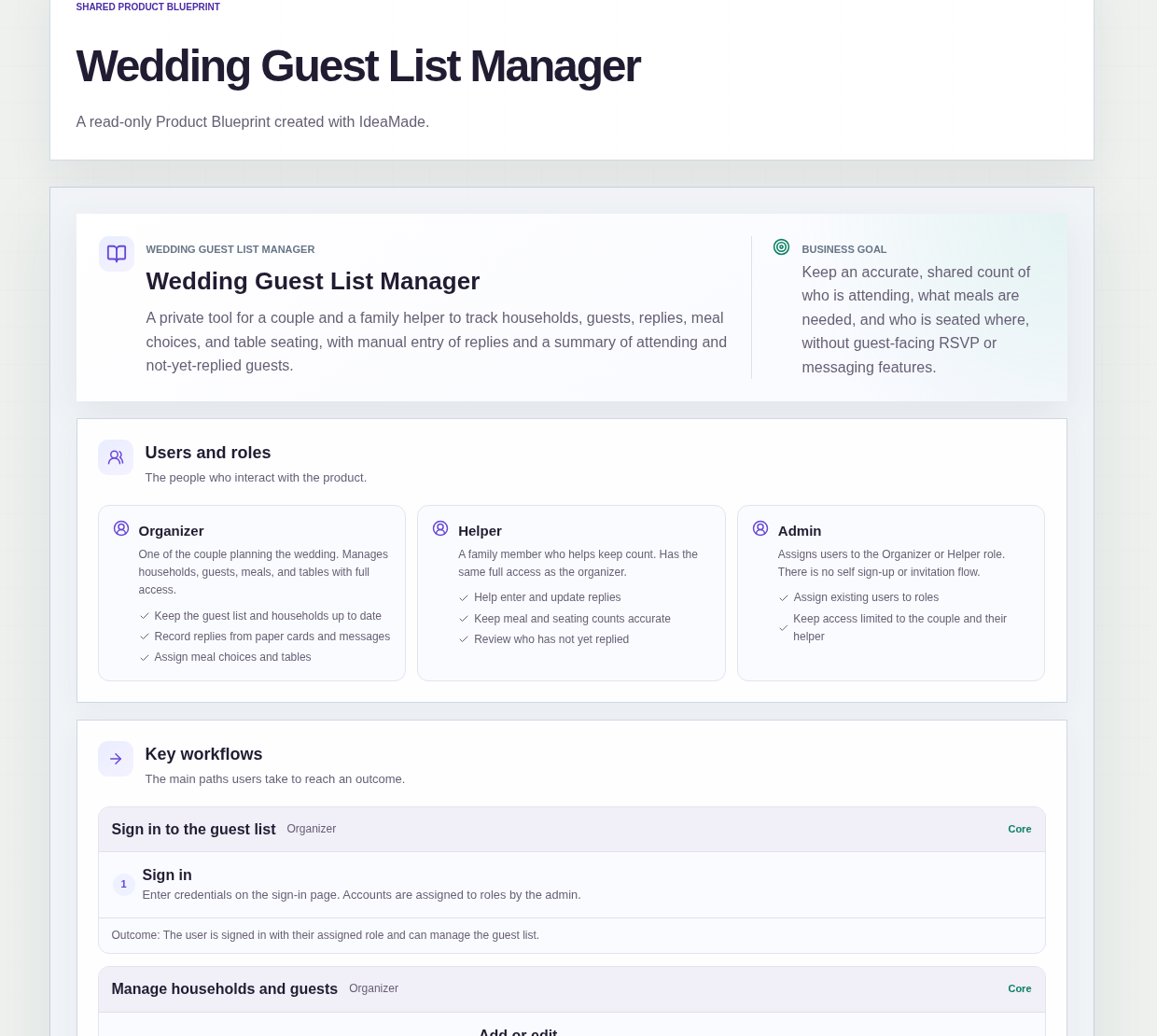
This sample blueprint is a private wedding guest list manager: guests are grouped by household, each reply is entered by hand, and a summary shows who is attending, who has not replied yet and how many of each meal you need.
Who this is for
- Couples planning their own wedding who collect replies on paper cards and in messages
- A parent or sibling helping the couple keep the count straight
- Anyone who wants a wedding RSVP tracker without a spreadsheet and without a wedding website
Sample blueprint, read-only. Open it with no sign-in. Select "Build this app with IdeaMade" at the bottom to open it in the blueprint editor, where you can change it and continue.
Building the app requires signing in.
The sample is a private guest list that people sign in to use.
It has three roles:
- Organizer: one of the couple, who keeps households and guests up to date, records replies from paper cards and messages, and assigns meal choices and tables
- Helper: a family member who helps keep count, with the same full access as the organizer
- Admin: assigns existing users to the Organizer or Helper role and keeps access limited to the couple and their helper
There is no self sign-up or invitation flow.
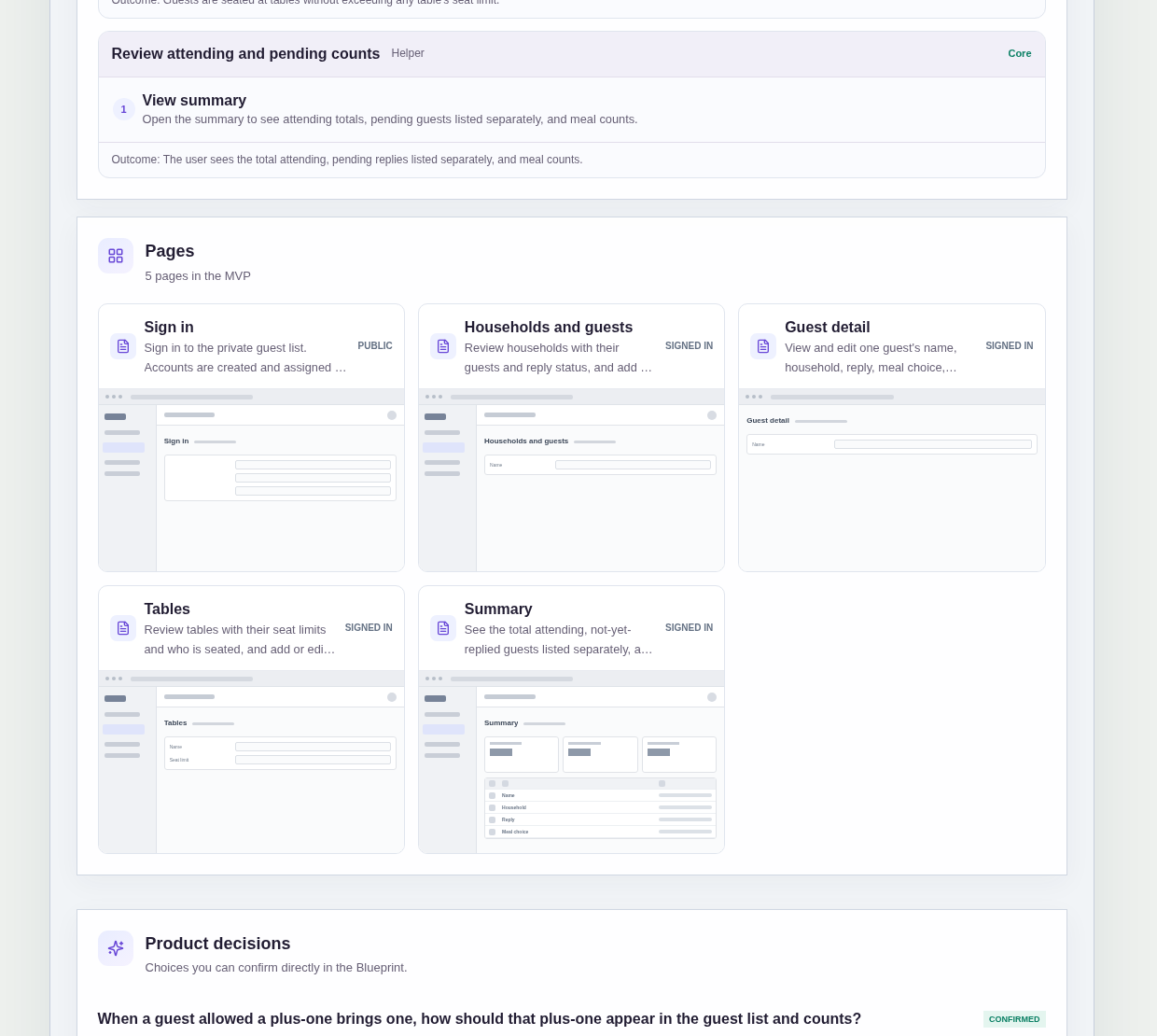
It has five pages:
- Sign in: the entry to the private guest list
- Households and guests: every household with its guests and their reply status, where you add or edit households and guests
- Guest detail: one guest's name, household, reply, meal choice, table and plus-one allowance
- Tables: every table with its seat limit and who is seated there
- Summary: the total attending, guests who have not replied yet listed separately, and meal counts
A household has a name and the guests in it.
A guest has a name, a household, a reply, a meal choice, a table and a plus-one allowance.
A table has a name and a seat limit.
Sample data.
A wedding guest list goes wrong in a few familiar ways.
A reply arrives in a message and never makes it into the count.
Nobody is sure whether a plus-one was already included in the number.
A table ends up with more chairs promised than it holds.
The sample is built around one shared list, so the couple and their helper work from the same numbers.
Example scenario: a paper card comes back from the Chen household. The organizer opens the household, records the reply for each guest by hand and sets a meal choice for the guests who are attending. The helper later opens Tables and seats them at a table that still has room. The summary updates the attending total and the meal counts.
Here is how the app is set up.
Guests are grouped by household.
Every guest belongs to a household, and the main list shows each household with its guests and their reply status.
When a card arrives for a whole family, you find one household and update everyone in it in one place.
Replies are entered by hand.
The couple or the helper records each reply from paper cards and messages.
Guests do not reply through the app, so the list holds only what the couple has actually received and entered.
A meal choice is set when a guest is attending.
When you record a reply, you set a meal choice for a guest who is attending.
The sample assumes meal choices are typed as free text, because no fixed menu was given.
That assumption is still marked as needing confirmation in the blueprint.
A plus-one is a separate guest.
This was a confirmed product decision in the sample.
When a guest allowed a plus-one brings one, the plus-one is recorded as a separate guest with their own reply, meal choice and table.
The plus-one is then counted and seated like anyone else, instead of hiding as a note on another guest.
Each guest record shows whether a plus-one is allowed.
The plus-one allowance is part of the guest detail, next to the reply, meal choice and table.
Before adding a plus-one, you can check the original guest's record.
Tables have seat limits.
Each table has a name and a seat limit, and the Tables page shows who is seated at each one.
In the sample, guests are assigned to tables while respecting the seat limit, so seating stays within each table's limit.
The summary separates attending guests from pending replies.
The summary shows the total attending, lists guests who have not replied yet separately, and shows meal counts.
That gives you a number to send the caterer and a list of people to follow up with yourself.
The couple and the helper share one list.
The Organizer and the Helper have the same full access, and the Admin assigns each person to a role.
Access stays limited to the couple and their helper.
The list records; it does not send anything.
The sample has no guest-facing RSVP page, invitations, reminders or wedding website.
How do I track wedding RSVPs without a spreadsheet?
Keep one guest list where every guest belongs to a household and has a reply, a meal choice and a table.
In this sample, the couple or a family helper enters each reply by hand from paper cards and messages.
A summary page then shows the total attending, lists guests who have not replied yet separately, and shows meal counts, so nobody has to tally replies across chat threads.
How should I count plus-ones on a wedding guest list?
Record each plus-one as a separate guest with their own reply, meal choice and table.
That was the confirmed decision in this sample blueprint.
Because the plus-one is a full guest record, they appear in the attending total, the meal counts and the seating like everyone else.
Each original guest's record also shows whether a plus-one is allowed, so you can check before adding one.
How do I get a meal count for the wedding caterer?
Set a meal choice on every guest who is attending, then read the meal counts on a summary page.
In this sample, the meal choice is set when a reply is recorded, and the summary shows meal counts next to the total attending.
The sample assumes meal choices are free text, which is still marked for confirmation, so you may want a fixed menu instead.
Can I build my own wedding guest list app without coding?
Yes, for a simple private guest list.
With IdeaMade, you describe your households, guest fields, tables and summary in plain language.
IdeaMade turns that into a blueprint you can review and change before anything is built.
Then you build the app, preview it with test data, and check the counts and seating before you rely on it for the caterer and the seating plan.
Copy this prompt, change the parts in brackets, and paste it into the blueprint generator:
Build a private wedding guest list manager for [a couple planning their own wedding] with [a family member] who helps keep count. Roles: Organizer and Helper, both with full access; an admin assigns users to roles, with no self sign-up or invitations. Guests are grouped by household, and replies are entered by hand from [paper cards and messages]. Pages: Sign in; Households and guests (households with their guests and reply status, add and edit); Guest detail (name, household, reply, meal choice, table, plus-one allowed); Tables (name, seat limit, who is seated, keep seating within each limit); Summary (total attending, not-yet-replied guests listed separately, meal counts). A plus-one is recorded as a separate guest with their own reply, meal choice and table. Meal choices are [free text]. Do not add guest-facing RSVP pages, invitations, reminders, a wedding website or real-time collaboration.
Your idea, made real.