A recruiter calls about a role you applied to five weeks ago.
You open your spreadsheet, find the row, and it says only "applied".
There is no contact name, no note on what the posting asked for, and no record of when anything happened.
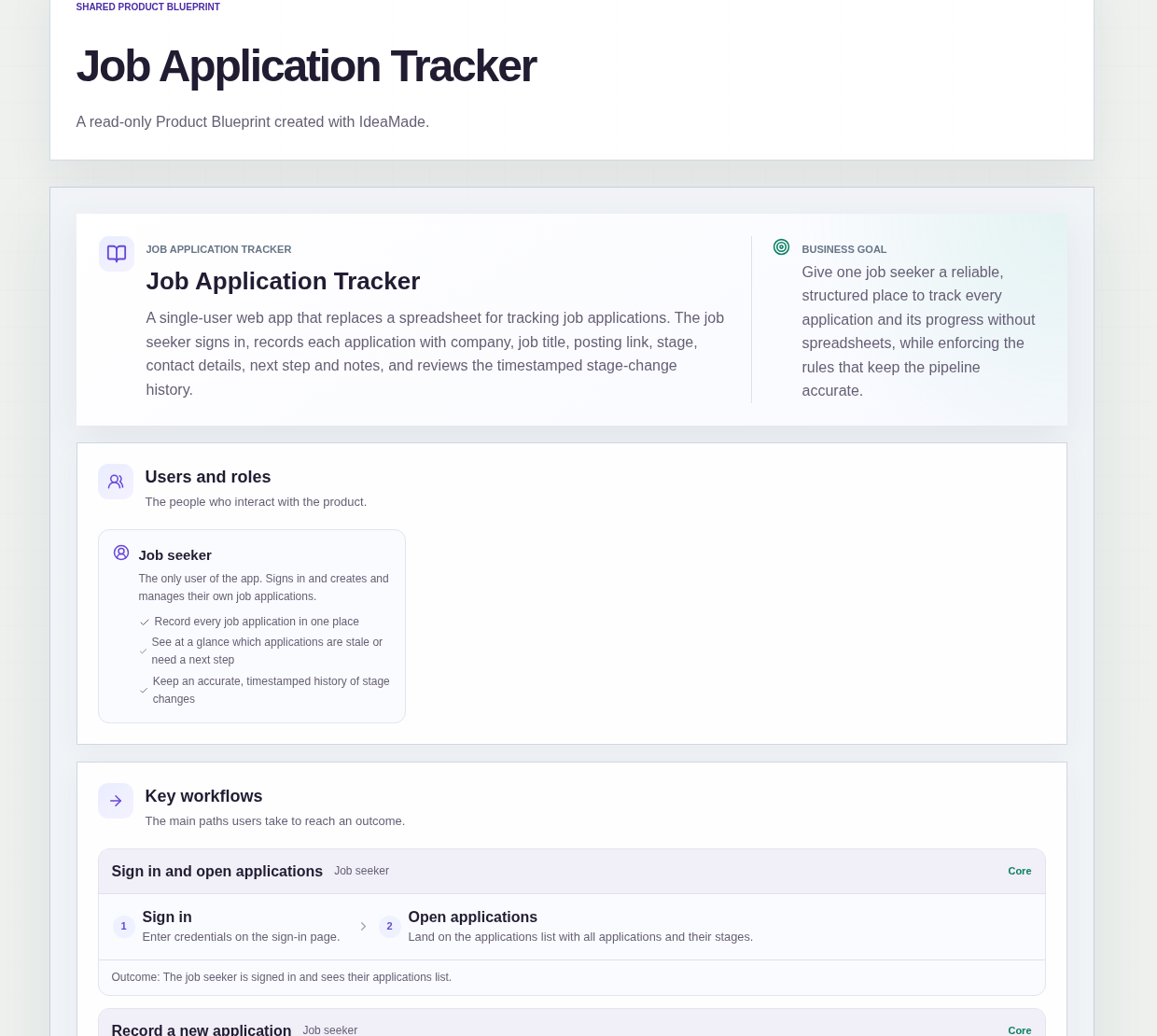
This sample blueprint is a job application tracker for one job seeker: each application has a company, a job title, a stage, a contact and a next step, and every stage change is recorded with its date and time.
Who this is for
- Designers applying to studios and product teams at the same time
- Product managers running a long search with several interview loops
- Career changers sending many applications to roles in a new field
- Anyone whose application spreadsheet has more rows than they can keep accurate
Sample blueprint, read-only. Open it with no sign-in. Select "Build this app with IdeaMade" at the bottom to open it in the blueprint editor, where you can change it and continue.
Building the app requires signing in.
The sample is a single-user app for the job seeker, who signs in to use it.
There is one role:
- Job seeker: the only user, who records and manages their own applications
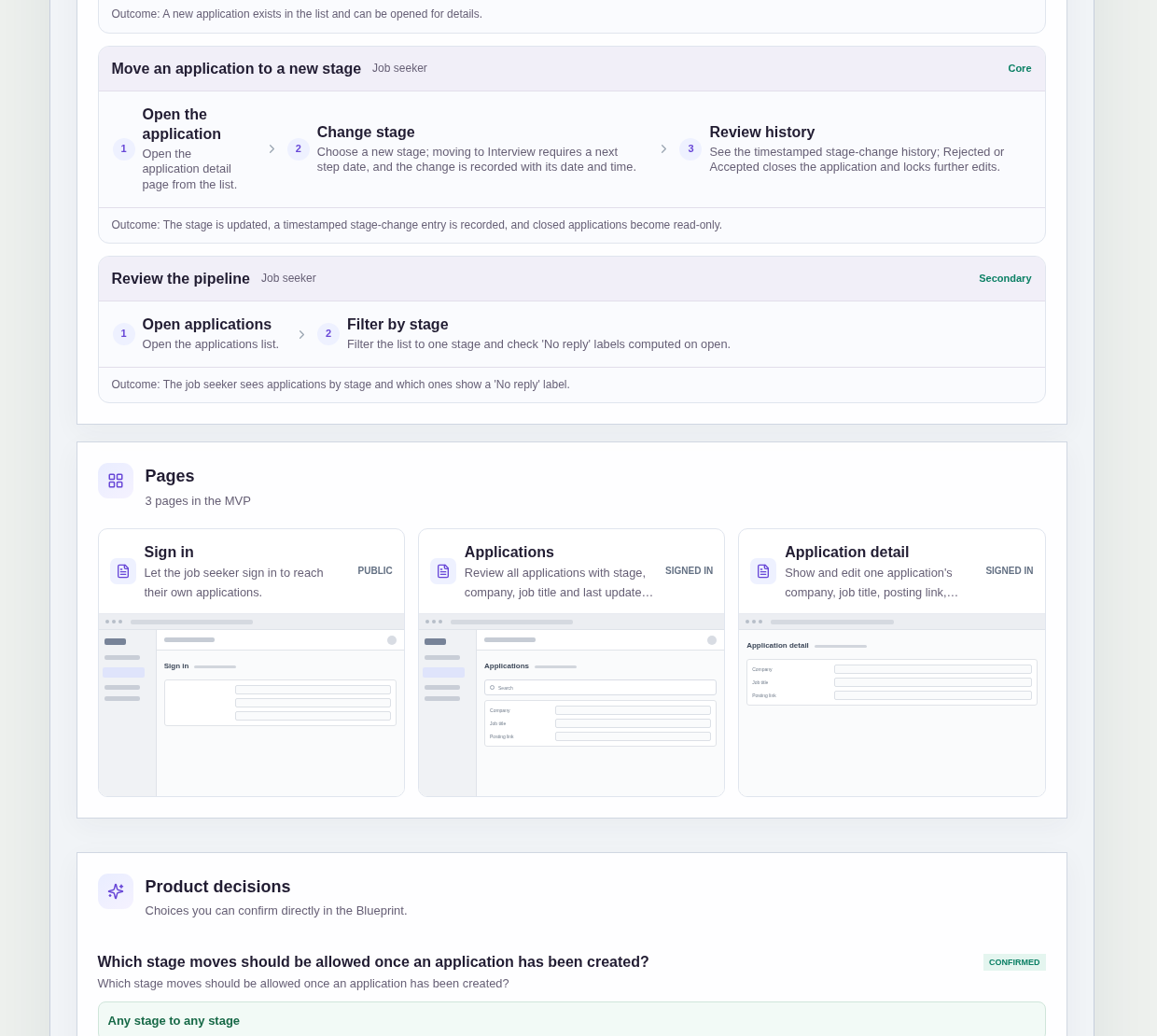
It has three pages:
- Sign in: so your applications stay private
- Applications: every application with its stage, company, job title and last updated date, a filter by stage, 'No reply' labels, and a way to create a new application
- Application detail: one application's full details, where you edit it, change its stage and see the timestamped history of stage changes
An application has a company, a job title, a posting link, a stage, a contact name and email, a next step and next step date, and notes.
Stages include Applied and Interview, and Rejected or Accepted closes an application.
When the list is empty, it invites you to create your first application.
Sample data.
When applications live in a spreadsheet, the same problems come back every week.
The same role gets entered twice, once from the job board and once from the company site.
An interview is on the way, but nobody wrote down when the next step happens.
An application goes quiet for weeks, and you only notice when you scroll past it.
The rules below give each application one record with a clear stage and a history you can trust.
Example scenario: you apply to a product designer role and create the application with the company, job title and the stage Applied. You add the posting link and the recruiter's name and email. Two weeks pass with no update, and the list shows a 'No reply' label. When the recruiter calls, you open the detail page, see when you applied, enter the date of the first interview and move the stage to Interview.
Here is how the app is set up.
The same company and job title cannot be added twice.
When you create an application, a duplicate company and job title is rejected.
That stops one role from appearing as two rows with different stages and different notes.
Moving to Interview requires a next step date.
An application cannot move to the Interview stage until it has a next step date.
Every interview in your pipeline comes with a date, so nothing important lives only in your inbox.
Every stage change is recorded with its date and time.
When you change an application's stage, the change is recorded with its date and time.
The detail page shows this history, so you can answer "when did I apply?" or "when did that interview start?" without guessing.
Any stage can move to any stage.
This was a confirmed product decision in the sample.
Job searches do not run in a straight line, so an application is not forced through stages in order.
The only limits are the next step date for Interview and the lock on closed applications.
Rejected or Accepted closes the application.
When an application is marked Rejected or Accepted, it is closed and further edits are locked.
A closed application is read-only, so the final outcome and its history stay exactly as they were.
A 'No reply' label shows applications that have gone quiet.
An application in Applied or Interview shows a 'No reply' label when more than 14 days have passed since it was last updated.
The blueprint assumes the label is computed each time the list is opened, not by a scheduled job.
It is a label on the list, and no reminders or notifications are sent.
The list filters by stage.
You can filter the applications list to one stage to see everything in Interview, or everything still waiting in Applied.
One person uses the tracker.
Sign-in identifies the single job seeker.
The sample has no sharing, multiple users or other roles.
What should a job application tracker include?
A job application tracker should include the company, job title, posting link, stage, contact name and email, next step and next step date, and notes for each application.
It should also keep a dated history of stage changes.
In this sample, the applications list shows stage, company, job title and last updated date, and it can be filtered by stage.
How do I track job applications without a spreadsheet?
Give each application one record with a stage, a contact and a next step, and let the app enforce the rules a spreadsheet cannot.
In this sample, a duplicate company and job title is rejected, moving to Interview requires a next step date, and every stage change is recorded with its date and time.
Rejected or Accepted applications become read-only.
How do I know which job applications have gone quiet?
Look at how long each open application has gone without an update.
In this sample, an application in Applied or Interview shows a 'No reply' label when more than 14 days have passed since it was last updated.
The label is computed each time the list is opened, not by a scheduled job, and it does not send reminders or notifications.
Can I build my own job application tracker without coding?
Yes, for a simple tracker that only you use.
With IdeaMade, you describe your application fields, stages and rules in plain language.
IdeaMade turns that into a blueprint you can review and change before anything is built.
Then you build the app, preview it with a few test applications, and check the duplicate and Interview rules before you rely on it.
Copy this prompt, change the parts in brackets, and paste it into the blueprint generator:
Build a job application tracker for [a product designer] who is replacing a spreadsheet. The job seeker is the only user and signs in. Pages: Sign in; Applications (stage, company, job title, last updated, filter by stage, 'No reply' labels, create a new application); Application detail (company, job title, posting link, stage, contact name and email, next step and next step date, notes, timestamped history of stage changes). A duplicate company and job title is rejected. Any stage can move to any stage. Moving to Interview requires a next step date. Every stage change is recorded with its date and time. Rejected or Accepted closes the application and locks further edits. An application in Applied or Interview with more than [14] days since it was last updated shows a 'No reply' label, computed each time the list is opened. No sharing or multiple users, no email or calendar sync, no browser extension, no importing from job boards, no reminders or notifications.