The new hire arrives on Monday morning, and only then does someone ask who was supposed to order the laptop.
In a company of about ten people, onboarding steps often live in one person's head.
This sample blueprint is a simple new hire onboarding checklist app: the operations lead keeps one template, creates a checklist from it for each new hire, and every task has an owner and a due date counted from the start date.
Who this is for
- Operations leads at small companies who run onboarding for every new hire
- Founders of a team of about ten who still onboard people themselves
- Team members who own a few onboarding tasks
- Small businesses that want an employee onboarding checklist tracker
Sample blueprint, read-only. Open it with no sign-in. Select "Build this app with IdeaMade" at the bottom to open it in the blueprint editor, where you can change it and continue.
Building the app requires signing in.
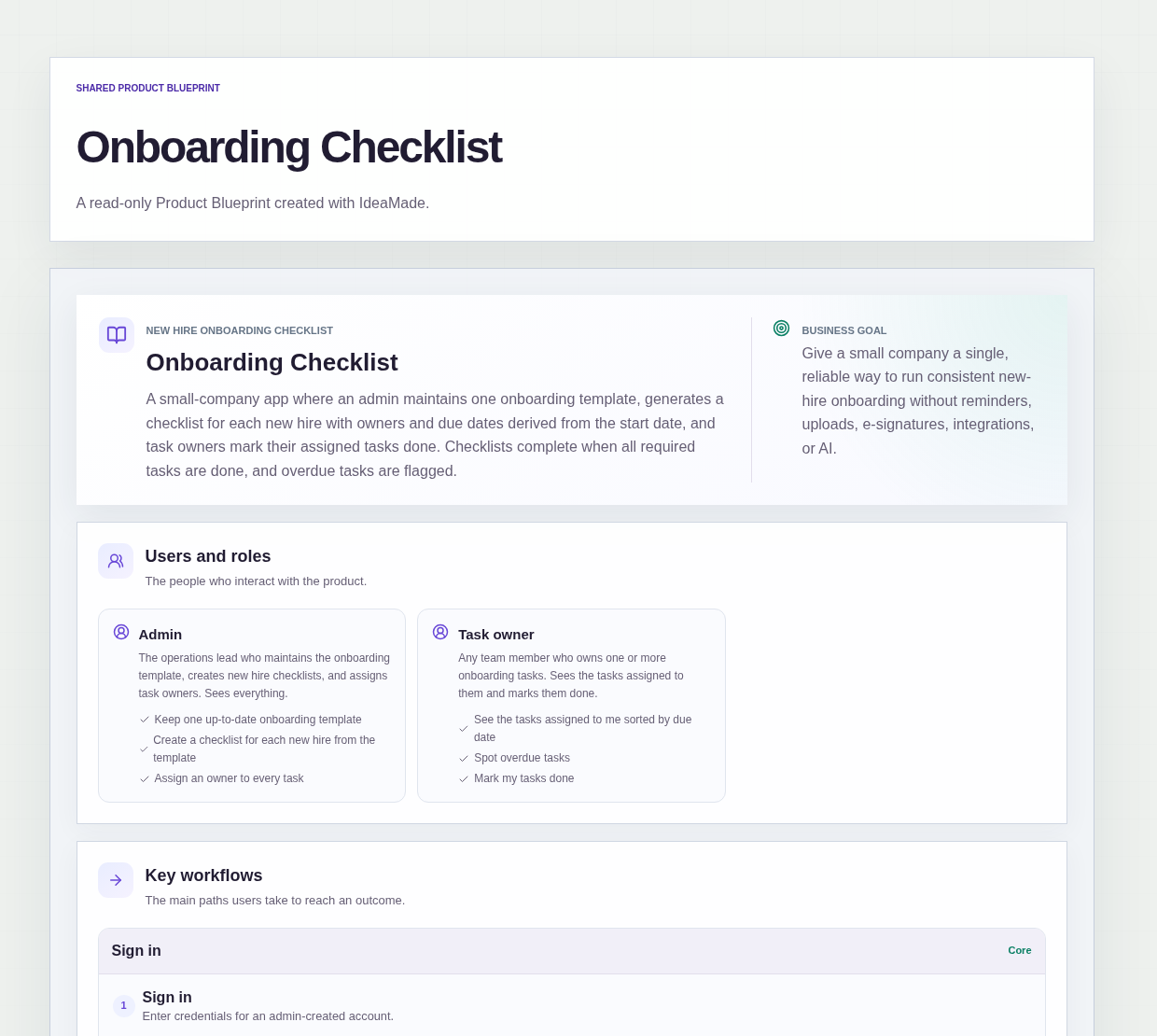
The sample is an onboarding checklist app with two roles.
- Admin: the operations lead, who maintains the onboarding template, creates a checklist for each new hire, assigns task owners and sees everything
- Task owner: any team member who owns one or more onboarding tasks, sees the tasks assigned to them and marks them done
The admin creates the accounts and assigns team members to roles.
There is no self sign-up or invitation flow.
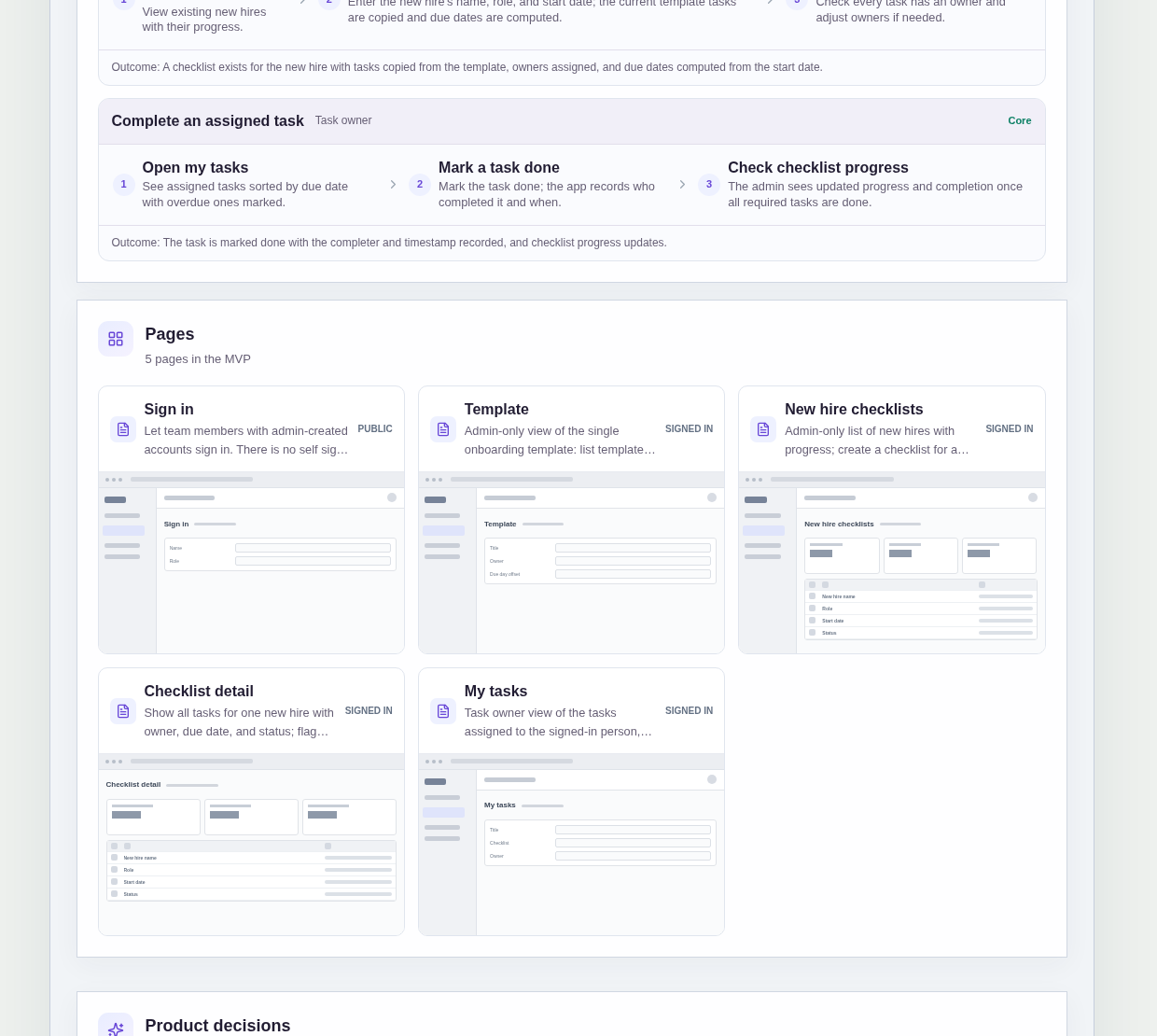
It has five pages:
- Sign in: for team members with an admin-created account
- Template: the single onboarding template, where the admin lists, adds and edits template tasks and assigns team members to roles
- New hire checklists: every new hire with their progress, and a way to create a new checklist
- Checklist detail: all tasks for one new hire with owner, due date and status, with overdue tasks flagged and owners editable
- My tasks: the signed-in person's assigned tasks, sorted by due date, with overdue tasks marked and a way to mark each one done
A template task has a title, an owner, a due day offset and is either required or optional.
A new hire checklist has the new hire's name, role, start date and a status.
Sample data.
Onboarding in a small company slips in familiar ways.
A task is on the list, but nobody knows whose job it is.
Everyone knows the laptop has to be ready, but nobody knows by which day.
Nobody can say for sure whether a new hire's onboarding is finished.
The rules below give each task an owner and a date.
Example scenario: the template has a required task "Order laptop" due a few days before the start date. The admin creates a checklist for a new hire starting next Monday, and the task is copied with a due date computed from that Monday. Its owner sees it near the top of My tasks, sorted by due date.
Here is how the app is set up.
There is one onboarding template for every new hire.
The company keeps exactly one onboarding template shared by all new hires.
This is an accepted assumption in the sample.
Every new hire starts from the same list.
A checklist is copied from the template when it is created.
When the admin creates a checklist, the current template tasks are copied into it.
Later edits to the template do not change checklists that already exist.
The admin can improve the process without changing the list of someone who has already started.
Due dates are computed from the start date.
Each template task has a due day offset relative to the new hire's start date.
When the checklist is created, the app computes each task's due date from the start date.
Nobody counts days on a calendar by hand.
Every task has an owner.
Each template task names an owner.
After creating a checklist, the admin reviews the checklist detail, checks that every task has an owner and adjusts owners if needed.
That prevents a task from sitting on the list with nobody responsible for it.
Task owners see their own tasks in due date order.
The My tasks page shows the tasks assigned to the signed-in person, sorted by due date.
The earliest due task is at the top, so nobody has to search every checklist.
Overdue tasks are marked.
Overdue tasks are flagged on the Checklist detail page and marked on the My tasks page.
A late task stands out on both pages instead of waiting for someone to notice.
Marking a task done records who did it and when.
When a task owner marks a task done, the app records who completed it and when.
That answers "did anyone do this?" without asking around.
A checklist is complete when all required tasks are done.
Each template task is either required or optional.
Progress updates as tasks are marked done, and the checklist shows as complete once all required tasks are done.
The checklist tracks the work; it does not send anything.
The sample has no email or calendar reminders, notifications, uploads, e-signatures or integrations; people check My tasks themselves.
What should a new hire onboarding checklist include?
A new hire onboarding checklist should include every onboarding task with a title, an owner, a due date and whether it is required or optional.
In this sample, tasks come from one shared template, and each due date is computed from the new hire's start date and a due day offset.
A checklist per new hire then shows progress and which tasks are still open.
How do I make sure every onboarding task has an owner?
Put an owner on every task in the onboarding template, so each new hire's checklist starts with owners already filled in.
In this sample, the admin then reviews the checklist detail after creating it, checks that every task has an owner and reassigns tasks if needed.
Each task owner sees their assigned tasks on a My tasks page, sorted by due date, with overdue tasks marked.
What happens to existing checklists when I change the onboarding template?
Nothing; existing checklists stay as they were.
In this sample, a new hire's checklist is copied from the current template when the admin creates it.
Later edits to the template only affect checklists created after the change.
The admin can improve the process without changing the list of someone who has already started.
Can I build my own onboarding checklist app without coding?
Yes, for a simple internal checklist.
With IdeaMade, you describe your roles, template tasks, due date rules and pages in plain language.
IdeaMade turns that into a blueprint you can review and change before anything is built.
Then you build the app, preview it, and check the rules before your team relies on it.
Copy this prompt, change the parts in brackets, and paste it into the blueprint generator:
Build a new hire onboarding checklist app for [a small company of about 10 people]. Roles: Admin, who maintains one template, creates checklists, assigns task owners and sees everything; and Task owner, who sees their assigned tasks and marks them done. The admin creates accounts and assigns roles; no self sign-up. A template task has a title, an owner, a due day offset relative to the start date, and is required or optional. A new hire checklist has the new hire's name, role, start date and status. Creating a checklist copies the current template tasks and computes due dates from the start date; later template changes do not affect existing checklists. Include a My tasks page sorted by due date with overdue tasks marked. Marking a task done records who completed it and when. A checklist is complete when all required tasks are done. Do not add [reminders, notifications, file uploads, e-signatures or integrations].
Your idea, made real.