In a 10-person studio, a purchase request starts as an email, gets a "looks fine" in a chat, and the amount changes twice before anyone pays.
A month later, nobody can say who approved it or what figure they agreed to.
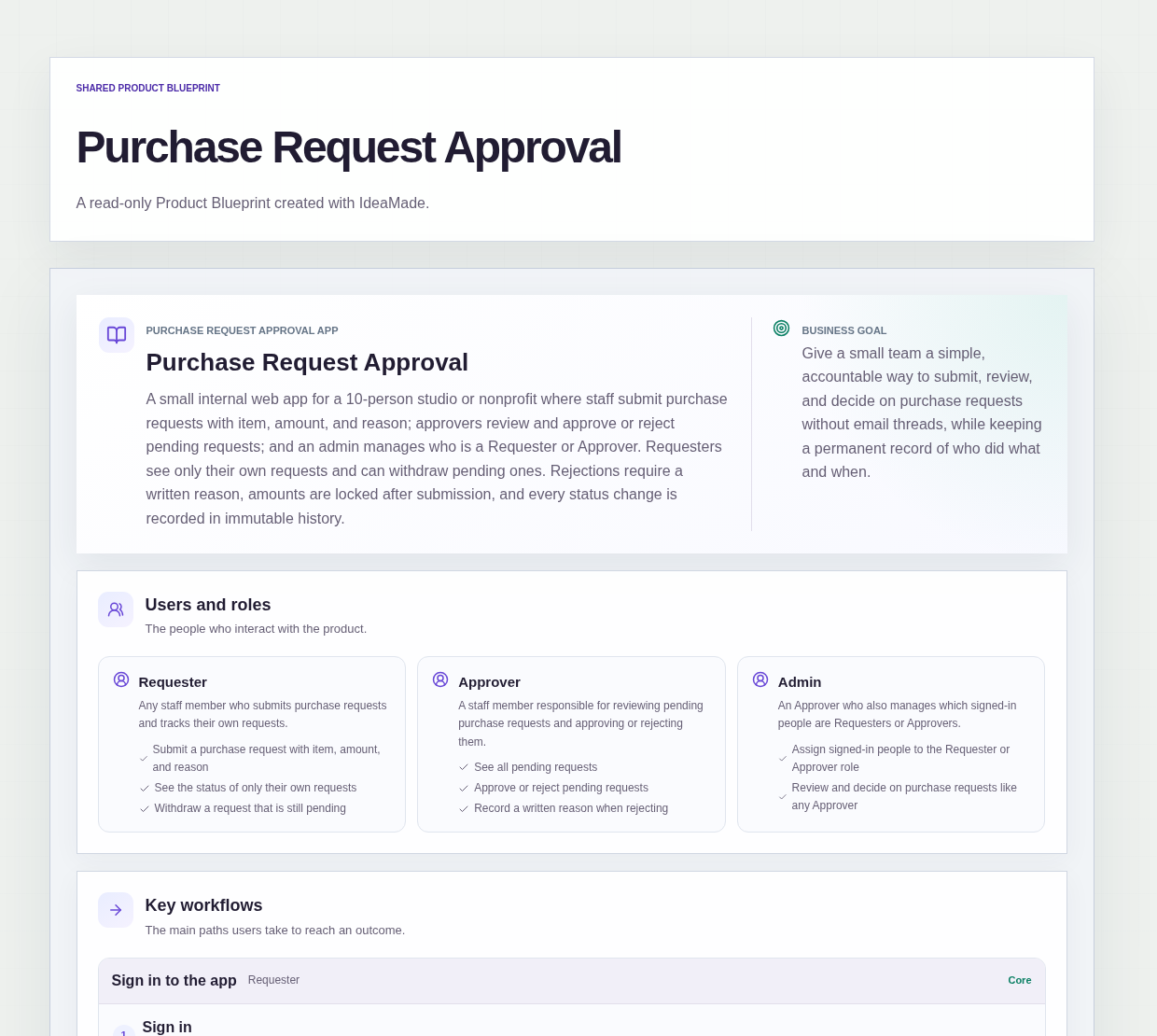
This sample blueprint is a purchase request approval app: staff submit requests with an item, an amount and a reason, approvers approve or reject them, and every status change is recorded in immutable history.
Who this is for
- Operations leads at small design studios who sign off on team spending
- Directors of small nonprofits who need a clear record of purchase decisions
- Staff who want to see where their own requests stand without asking
- Teams whose approvals currently live in email threads
Sample blueprint, read-only. Open it with no sign-in. Select "Build this app with IdeaMade" at the bottom to open it in the blueprint editor, where you can change it and continue.
Building the app requires signing in.
The sample is a small internal app with three roles.
- Requester: submits purchase requests, sees only their own requests, and can withdraw a request that is still pending
- Approver: sees all pending requests and approves or rejects them, with a written reason when rejecting
- Admin: an Approver who also assigns signed-in people to the Requester or Approver role
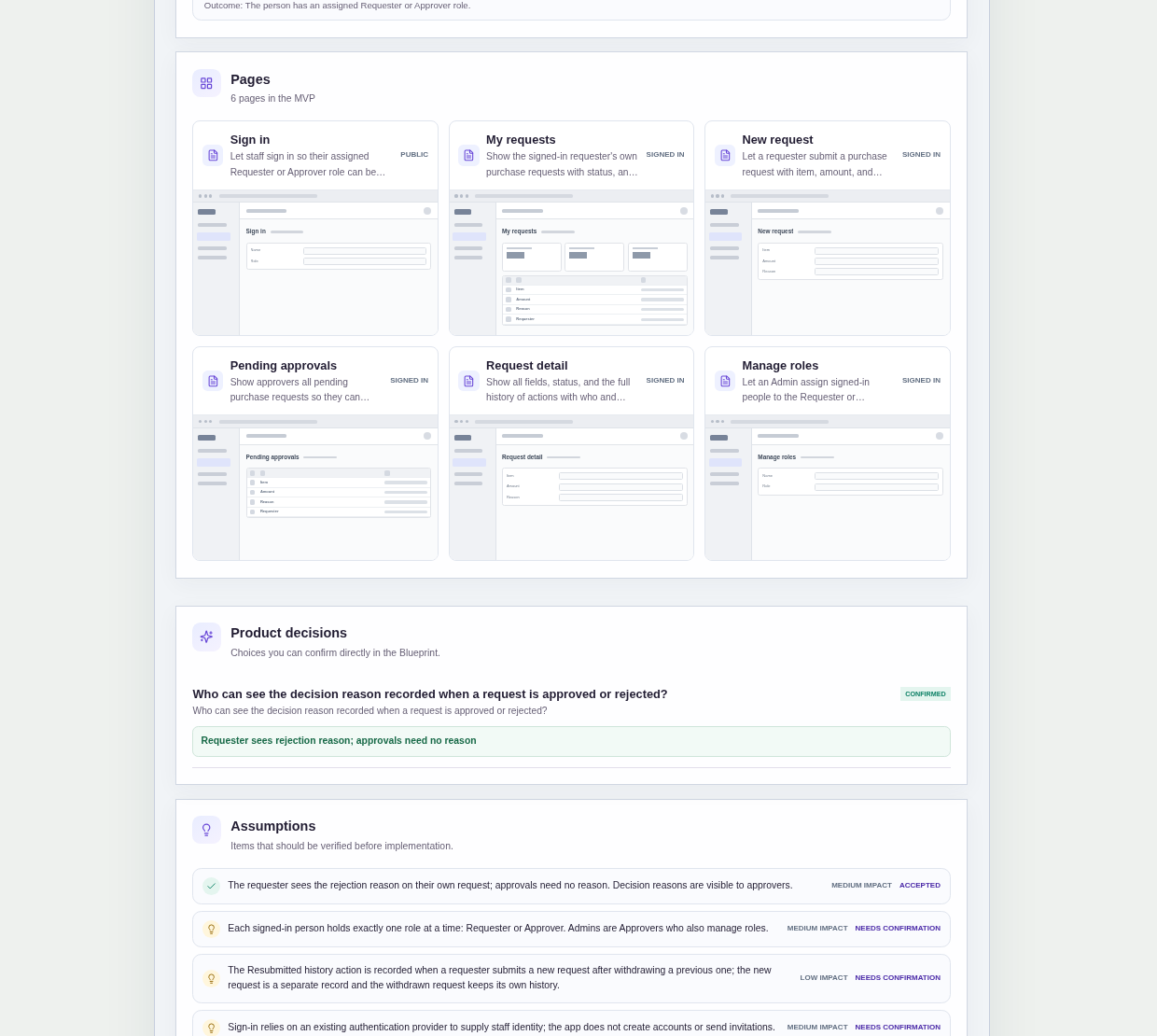
It has six pages:
- Sign in: so each person's assigned role can be applied
- My requests: the signed-in requester's own requests with their status, and a way to create a new one
- New request: a form with item, amount and reason
- Pending approvals: every pending request for approvers to open and decide
- Request detail: all fields, the status, the full history of who did what and when, and the actions the viewer is allowed to take
- Manage roles: where an Admin assigns signed-in people to Requester or Approver
A purchase request has an item, an amount, a reason and a requester.
A request is Pending after submission, and ends as Approved, Rejected or Withdrawn.
Sample data.
Approving purchases by email tends to fail in the same few ways.
Someone approves their own spending because nobody else was around.
A request is turned down with no explanation, so it comes back unchanged.
The amount is edited after approval, and the record no longer matches what was agreed.
The rules below keep every decision clear, attributable and on record.
Example scenario: a designer submits a request for a drawing tablet with an amount and the reason "current one has a dead pen sensor". It appears in Pending approvals. The operations lead rejects it with the written reason "please compare two models first". The designer sees that reason on their own request and submits a new request with a different amount.
Here is how the app is set up.
No one can approve or reject their own request.
A person can never approve or reject a request they submitted.
That prevents anyone from signing off on their own spending, even when they hold the Approver role.
Rejection requires a written reason.
An Approver cannot reject a request without writing why.
The requester sees the rejection reason on their own request, so they know what to change before asking again.
Approvals need no reason.
This was a confirmed product decision in the sample.
The amount is locked after submission.
Once a request is submitted, its amount cannot be changed.
To change the amount, the requester withdraws the pending request and submits a new one.
That prevents an approved figure from quietly growing after the decision.
Only pending requests can be withdrawn.
A requester can withdraw their own request while it is still pending.
The status becomes Withdrawn, and the withdrawal is recorded in the request's history.
Every status change is recorded in immutable history.
Submitting, withdrawing, approving and rejecting each add a history entry that records who did it and when.
The request detail page shows the full history.
That prevents the "who approved this?" question from depending on anyone's memory or inbox.
Requesters see only their own requests.
The My requests page shows only the signed-in requester's own purchase requests.
Approvers see all pending requests on the Pending approvals page.
An Admin assigns roles to signed-in people.
People sign in with an existing account, and an Admin assigns each signed-in person the Requester or Approver role on the Manage roles page.
The app does not create accounts, and there is no self sign-up or invitation flow.
That keeps the decision about who can approve with an Admin.
The sample does not include notifications or multi-level approval.
How do I stop people approving their own purchase requests?
Build the rule into the approval app itself.
In this sample, a person can never approve or reject a request they submitted, whatever their role.
Requests wait on the Pending approvals page for another Approver or Admin to decide.
Because every decision is recorded with who made it and when, the history also shows that a different person signed off on each request.
What should a purchase request include?
A purchase request should include the item, the amount, a reason for the purchase and who is asking.
In this sample, item, amount and reason are the fields on the New request form, and the Submitted history entry records who submitted it and when.
After submission, the amount is locked, so the figure being decided on cannot change.
What happens if a purchase request needs a different amount?
The requester withdraws the pending request and submits a new one with the correct amount.
In this sample, the amount is locked after submission, so it cannot be edited in place.
The withdrawn request keeps its status of Withdrawn and its own history entry, which records who withdrew it and when.
That keeps the record of what was originally asked for intact.
Can I build an approval workflow app with no code?
Yes, for a simple approval flow in a small team.
With IdeaMade, you describe your roles, request fields, statuses and approval rules in plain language.
IdeaMade turns that into a blueprint you can review and change before anything is built.
Then you build the app, preview it with test data, and check the rules before your team relies on it.
Copy this prompt, change the parts in brackets, and paste it into the blueprint generator:
Build a purchase request approval app for [a 10-person design studio]. Roles: Requester, Approver, and Admin (an Approver who also assigns signed-in people to the Requester or Approver role). A purchase request has an item, amount and reason. Requesters see only their own requests and can withdraw a pending one. Approvers see all pending requests and approve or reject them; rejection requires a written reason that the requester can see. A person can never approve or reject their own request. The amount is locked after submission; to change it, withdraw and submit a new request. Statuses: Pending, Approved, Rejected, Withdrawn. Every status change is recorded in immutable history with who and when. No self sign-up or invitations. Do not add [notifications] or multi-level approval.
Your idea, made real.