It is Thursday night, the last game just ended, and three captains are already asking where their team sits in the table.
You open the spreadsheet, find that last week's score was typed into the wrong row, and start recounting points by hand.
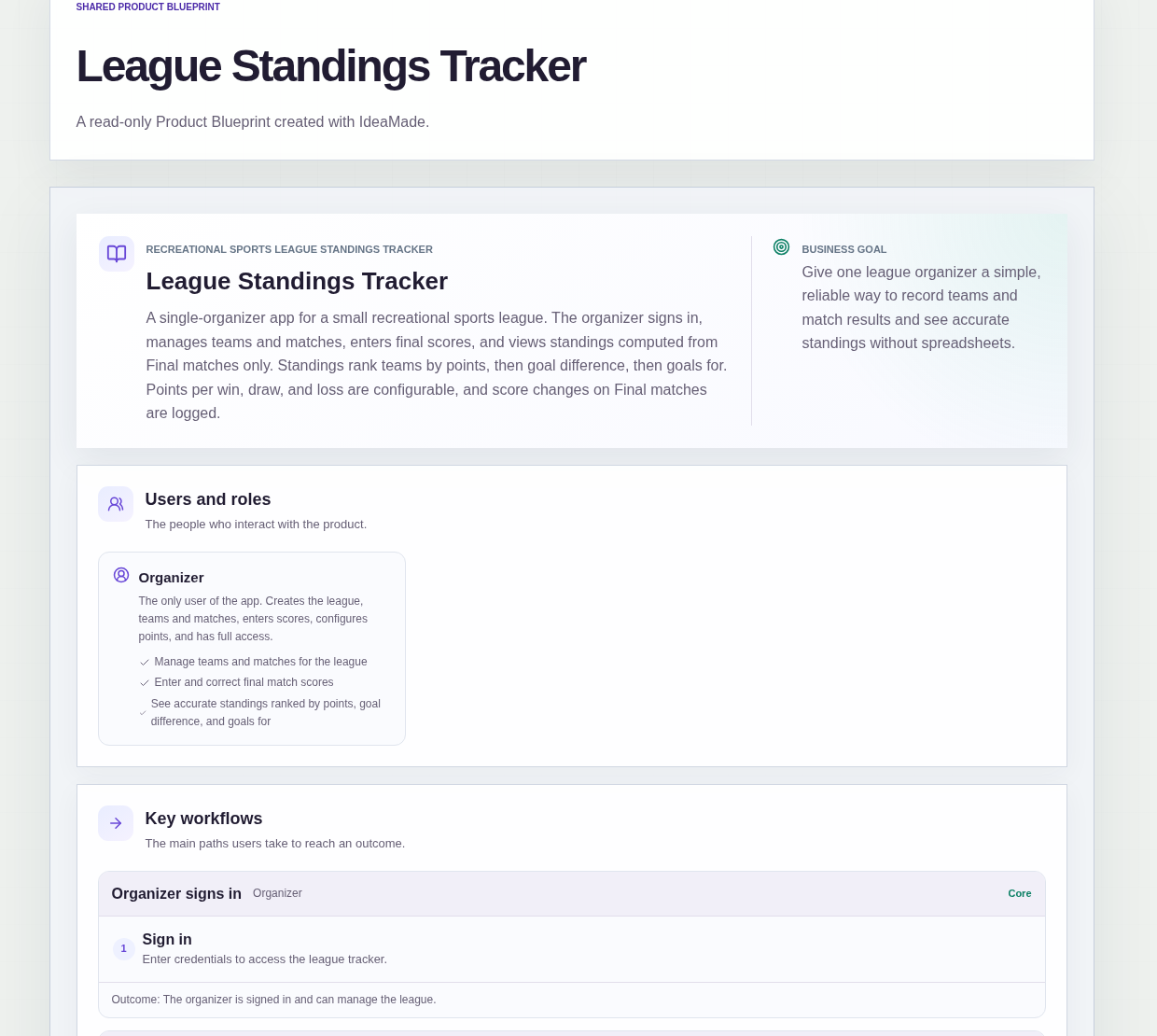
This sample blueprint is a league standings tracker for one organizer: you record teams, matches and final scores, and the standings table is calculated from the Final matches.
Who this is for
- Organizers of community basketball or soccer leagues who keep the table in a spreadsheet
- Company league coordinators who run one internal league each season
- Amateur frisbee league captains who end up doing the scorekeeping
- Anyone who has been asked "why are we only third?" and had to recount
Sample blueprint, read-only. Open it with no sign-in. Select "Build this app with IdeaMade" at the bottom to open it in the blueprint editor, where you can change it and continue.
Building the app requires signing in.
The sample is a single-user app for the league organizer, who signs in to use it.
The standings are for the organizer's own use; the sample does not include a public standings page for players.
There is one role:
- Organizer: the only user, who creates the teams and matches, enters scores, sets the points values and has full access
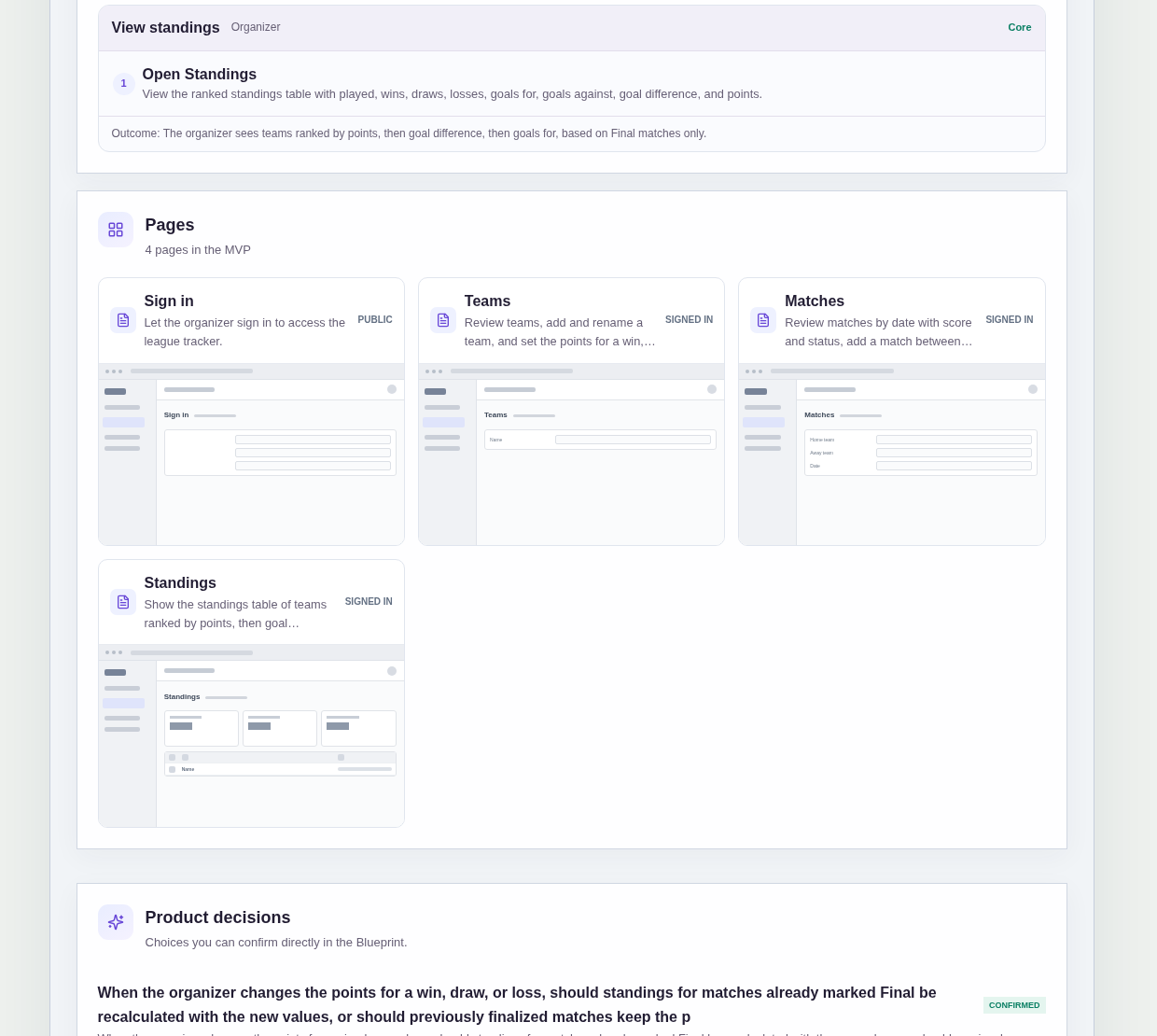
It has four pages:
- Sign in: so only the organizer can manage the league
- Teams: the team list, where the organizer adds or renames a team and sets the points for a win, a draw and a loss
- Matches: matches listed by date with score and status, where the organizer adds a match and enters or corrects the final score
- Standings: the ranked table with played, wins, draws, losses, goals for, goals against, goal difference and points
A match has a home team, an away team, a date, a score and a status.
The app tracks one league with a single points setting.
Sample data.
When standings live in a spreadsheet, the same problems come back every week.
A score gets typed twice, a team shows up on both sides of a fixture, or someone changes a result and nobody can say what it was before.
The rules below keep one record per match and let the table follow from the results.
Example scenario: the Hawks beat the Owls 3-1, and the organizer enters the score and marks the match Final. The next day a captain points out it was 3-2. The organizer corrects the score, the old and new score are saved in a score change entry, and the Standings table updates.
Here is how the app is set up.
Only Final matches count in the standings.
A match added for a future date has no effect on the table.
Once the organizer enters the home and away score and marks the match Final, it is counted.
That prevents a half-entered or upcoming match from moving teams up or down.
A team cannot play itself.
When adding a match, the organizer chooses two different teams and a date.
That prevents a fixture with the same team on both sides from adding a phantom win or loss.
Teams that have played a match cannot be deleted.
Teams can be added and renamed at any time.
A team with a match on record stays, so its results never disappear from the table and the other teams' records stay complete.
Corrections to a Final score are logged.
When the organizer changes the score of a Final match, the old and new score are recorded in a score change entry.
The entries can be reviewed from the Matches page and do not affect standings themselves.
That answers "who changed our result, and from what?" without guesswork.
Teams are ranked by points, then goal difference, then goals for.
The Standings table uses this three-step order.
When two teams are level on points, goal difference decides, and goals for decides after that.
Changing the points setting recalculates every Final match.
This was a confirmed product decision in the sample.
If the organizer changes the points for a win, a draw or a loss, all Final matches are recalculated with the current setting.
That prevents a table where early matches use old points values and later ones use new values.
How do I keep standings for a small rec league without a spreadsheet?
Record each match once and let the table be calculated from the results.
In this sample, the organizer adds teams, adds matches between two different teams with a date, and enters the final score.
The Standings table counts only Final matches and shows played, wins, draws, losses, goals for, goals against, goal difference and points.
How are ties in the standings broken?
In this sample, teams are ranked by points first.
If two teams have the same points, the team with the better goal difference ranks higher.
If goal difference is also level, the team with more goals for ranks higher.
The order is fixed in the blueprint, so you can change it there before building if your league uses different rules.
What happens if I enter a wrong score?
You correct it on the Matches page.
In this sample, changing the score of a Final match records the old and new score in a score change entry.
The standings update from the corrected score, and the entry stays available on the Matches page, so you can show a captain exactly what was changed.
The entries themselves do not affect standings.
Can players see the standings in this sample?
No, the sample is built for the organizer.
The organizer is the only user and signs in to see the Teams, Matches and Standings pages.
There is no public standings page, live scoring, registration, fees or notifications in this sample.
The organizer can share the results with players in whatever way the league already uses.
Copy this prompt, change the parts in brackets, and paste it into the blueprint generator:
Build a standings tracker for [a community soccer league] run by one organizer who signs in. Pages: Sign in; Teams (add and rename teams, set points for a win, a draw and a loss, such as [3, 1, 0]); Matches (matches by date with score and status, add a match between two different teams with a date, enter the home and away score and mark it Final, correct a Final score); Standings (played, wins, draws, losses, goals for, goals against, goal difference, points). Count only Final matches. Rank by points, then goal difference, then goals for. A team that has played a match cannot be deleted. Correcting a Final score records the old and new score in a score change entry. Changing the points setting recalculates all Final matches. One league only. No live scoring, fees, registration or notifications.
Your idea, made real.