Your Saturday pottery class has eight wheels.
You post it in a group chat, eleven people reply "I'm in", and by evening nobody can say who was first.
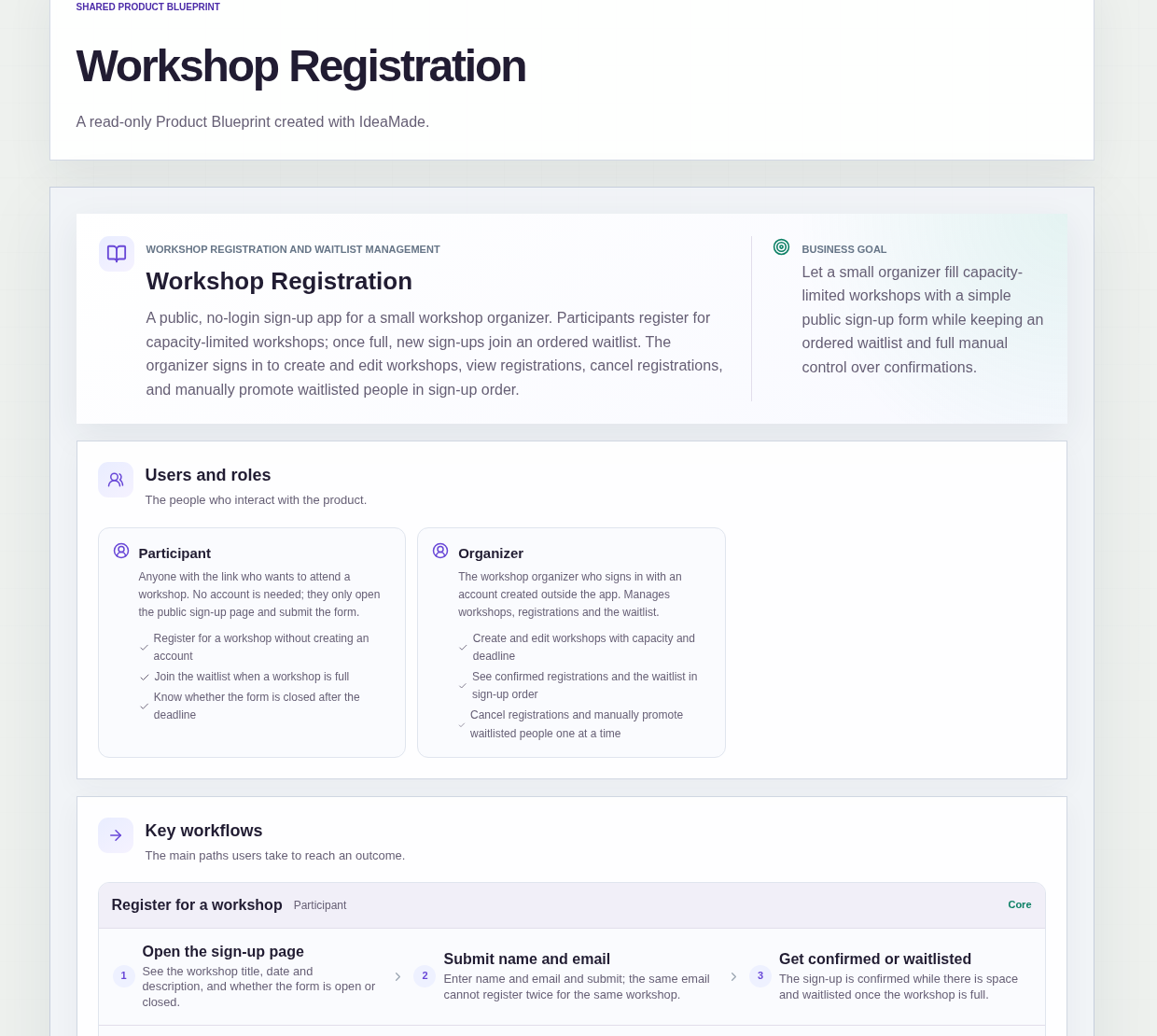
This sample blueprint is a workshop registration form with a capacity limit: people sign up on a public page, places are confirmed while there is space, later sign-ups join a waitlist in order, and you decide who moves up.
Who this is for
- Pottery, baking or craft teachers who run small classes with a fixed number of places
- Community event organizers who take sign-ups through messages today
- Anyone who needs a class sign-up with a waitlist and wants to stay in control of who gets a freed place
Sample blueprint, read-only. Open it with no sign-in. Select "Build this app with IdeaMade" at the bottom to open it in the blueprint editor, where you can change it and continue.
Building the app requires signing in.
The sample has a public side for participants and a signed-in side for the organizer.
It has two roles:
- Participant: anyone with the link who wants to attend; no account is needed, they only open the public sign-up page and submit the form
- Organizer: the person who runs the workshops and signs in with an account created outside the app
There is no self sign-up for organizer accounts.
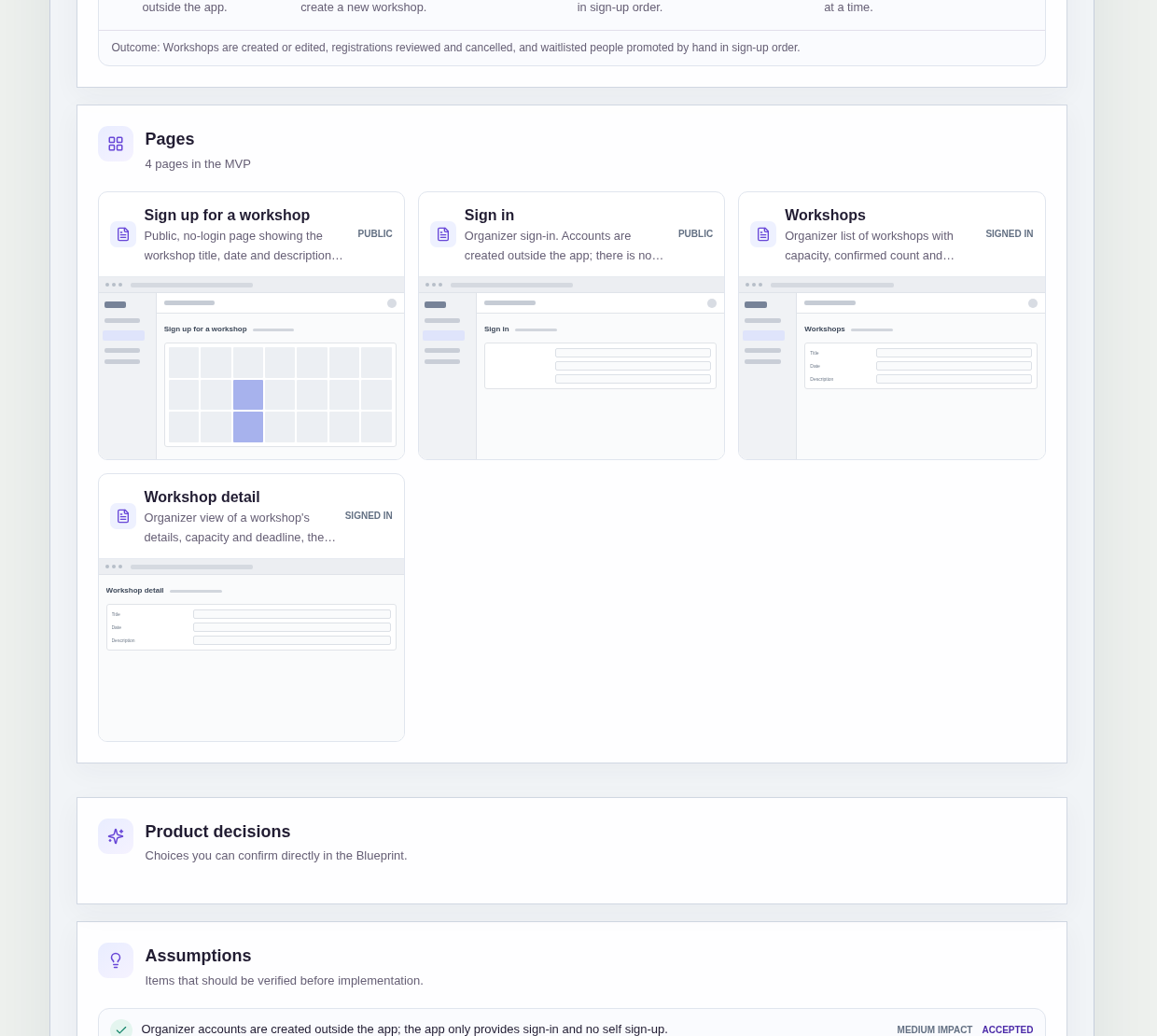
It has four pages:
- Sign up for a workshop (public): the workshop title, date and description with a name and email form, shown as closed once the registration deadline has passed
- Sign in (public): the organizer's sign-in page
- Workshops: the organizer's list of workshops with capacity, confirmed count and waitlist count, and a way to create a new workshop
- Workshop detail: one workshop's details, capacity and deadline, the confirmed people and the waitlist in sign-up order, with actions to cancel a registration and promote the next waitlisted person
A participant signs up with a name and an email.
The organizer sets each workshop's capacity and registration deadline.
Sample data.
When sign-ups arrive as chat replies, the same questions come back for every class.
Who replied first?
Did that person sign up twice under two messages?
Is anyone still joining after you have already planned materials?
The rules below give every sign-up a place in a clear order.
Example scenario: an eight-place pottery class receives eleven sign-ups. The first eight are confirmed and the next three join the waitlist in the order they signed up. When one confirmed person drops out, the organizer cancels that registration and promotes the first person on the waitlist.
Here is how the app is set up.
Sign-ups are confirmed while there is space.
Each workshop has a capacity.
A sign-up is confirmed while places are left and goes to the waitlist once the workshop is full.
The class cannot be overbooked by a burst of replies.
The waitlist keeps sign-up order.
The workshop detail page shows the waitlist in the order people signed up.
The first person to ask is the first person you see, so nobody has to scroll back through a chat to settle it.
One email, one registration per workshop.
The same email cannot register twice for the same workshop.
A participant who submits the form again is told they have already registered, so one person cannot hold two places or two spots in the queue.
The form closes at the registration deadline.
The organizer sets a registration deadline for each workshop.
Once it has passed, the public sign-up page shows the form as closed.
Late sign-ups stop at the date you chose, not when you remember to post "we're full".
Freed places are promoted by hand, one at a time.
When someone drops out, the organizer cancels their registration on the workshop detail page.
The organizer then promotes the next waitlisted person by hand, one at a time, in sign-up order.
The blueprint keeps this manual: nothing is promoted automatically, so you decide when each freed place is given.
Participants see their result on the sign-up page.
The sample sends no emails or notifications.
When a participant submits the form, the page tells them whether they are confirmed, waitlisted, already registered or too late because the form is closed.
The organizer sees every workshop at a glance.
The Workshops page lists each workshop with its capacity, confirmed count and waitlist count.
You can see which classes are full and which still have room before opening any of them.
How do I make a workshop registration form with a capacity limit?
Give each workshop a capacity and confirm sign-ups only while places are left.
In this sample, the organizer sets the capacity and a registration deadline for each workshop.
Participants fill in a public form with their name and email, with no account needed.
A sign-up is confirmed while there is space and goes to a waitlist once the workshop is full.
How does a class sign-up with a waitlist decide who gets a freed place?
In this sample, the waitlist keeps the order in which people signed up.
When a confirmed person drops out, the organizer cancels their registration and promotes the next waitlisted person by hand, one at a time.
Nothing is promoted automatically, so the organizer decides when each freed place is given.
Can the same person register twice for one workshop?
No, not with the same email.
In this sample, the same email cannot register twice for the same workshop.
A second attempt is answered on the sign-up page with a note that the person has already registered.
That keeps one person from holding two places, or taking a place and a waitlist spot at once.
Can I build a workshop sign-up app without coding?
Yes, for a simple sign-up app for a small organizer.
With IdeaMade, you describe your roles, pages, capacity, deadline and waitlist rules in plain language.
IdeaMade turns that into a blueprint you can review and change before anything is built.
Then you build the app, preview it with test sign-ups, and check the rules before you share the link.
Copy this prompt, change the parts in brackets, and paste it into the blueprint generator:
Build a workshop registration app for [a small organizer of pottery, baking or community workshops]. Participants need no account: they open a public sign-up page showing the workshop title, date and description and submit their name and email. The organizer signs in with an account created outside the app, with no self sign-up. Pages: Sign up for a workshop (public, shows closed after the registration deadline); Sign in; Workshops (capacity, confirmed count, waitlist count, create a workshop); Workshop detail (details, capacity, deadline, confirmed people, waitlist in sign-up order, cancel a registration, promote the next waitlisted person). Each workshop has a capacity of [8] places: a sign-up is confirmed while there is space and waitlisted once the workshop is full. The same email cannot register twice for the same workshop. Promotion from the waitlist is manual, one at a time, in sign-up order. No emails or notifications.