A customer picks up their phone, points at a scratch on the back and says it was not there when they dropped it off.
Another one says they agreed to a lower quote, and the only record is a paper claim ticket with two different numbers crossed out.
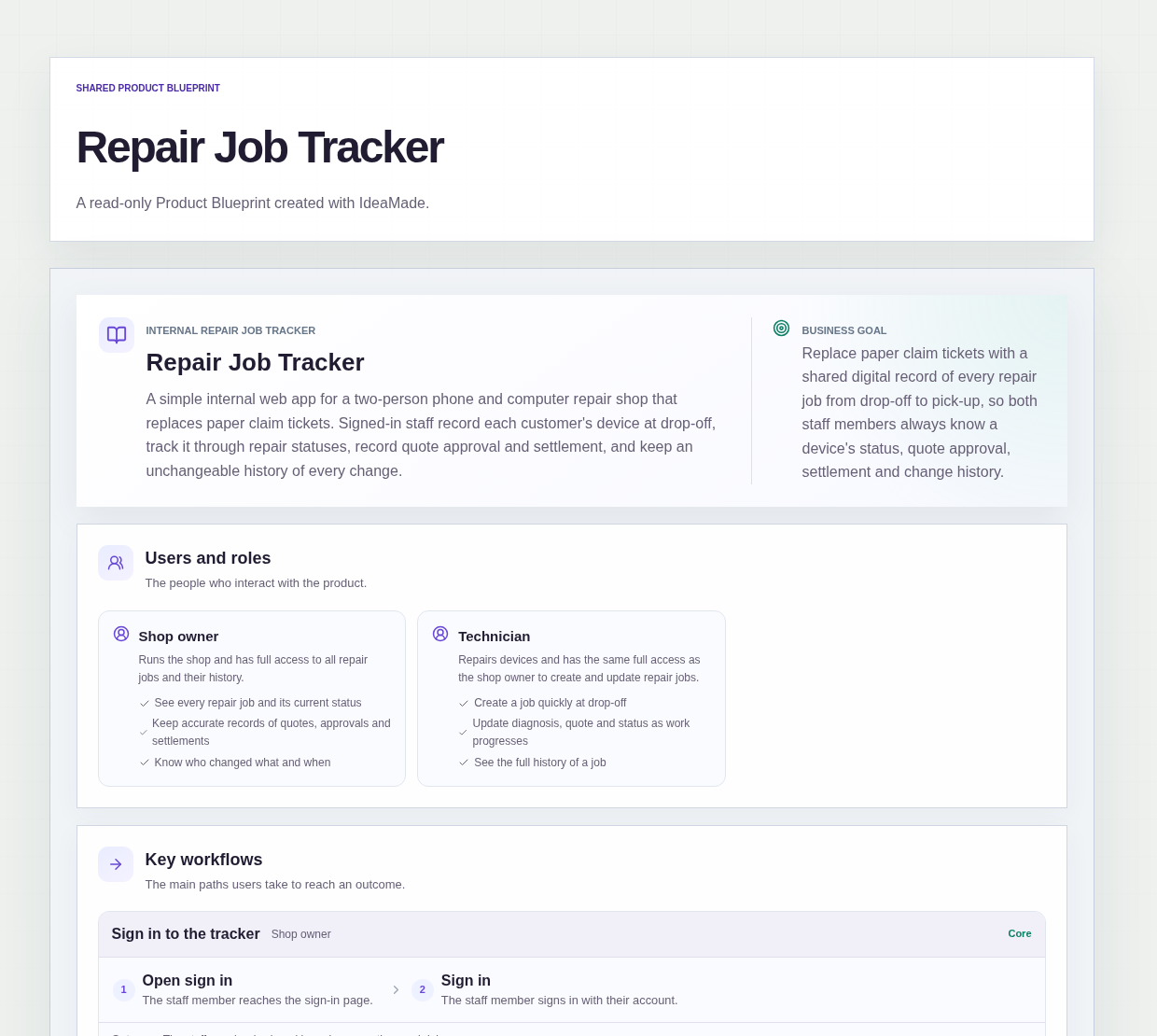
This sample blueprint is a repair job tracker for a two-person phone and computer repair shop: each device is recorded at drop-off, quote approval and settlement are marked on the job, and every change goes into a history that cannot be edited or deleted.
Who this is for
- Owners of small phone and computer repair shops who still write paper claim tickets
- Technicians who need to see a device's status, quote and history before starting work
- Two-person shops where both people take in devices and hand them back
Sample blueprint, read-only. Open it with no sign-in. Select "Build this app with IdeaMade" at the bottom to open it in the blueprint editor, where you can change it and continue.
Building the app requires signing in.
The sample is an internal app for shop staff, who sign in to use it.
It has two roles with the same full access:
- Shop owner: runs the shop, sees every repair job and its history, and keeps quotes, approvals and settlements accurate
- Technician: creates jobs at drop-off and updates diagnosis, quote and status as the work progresses
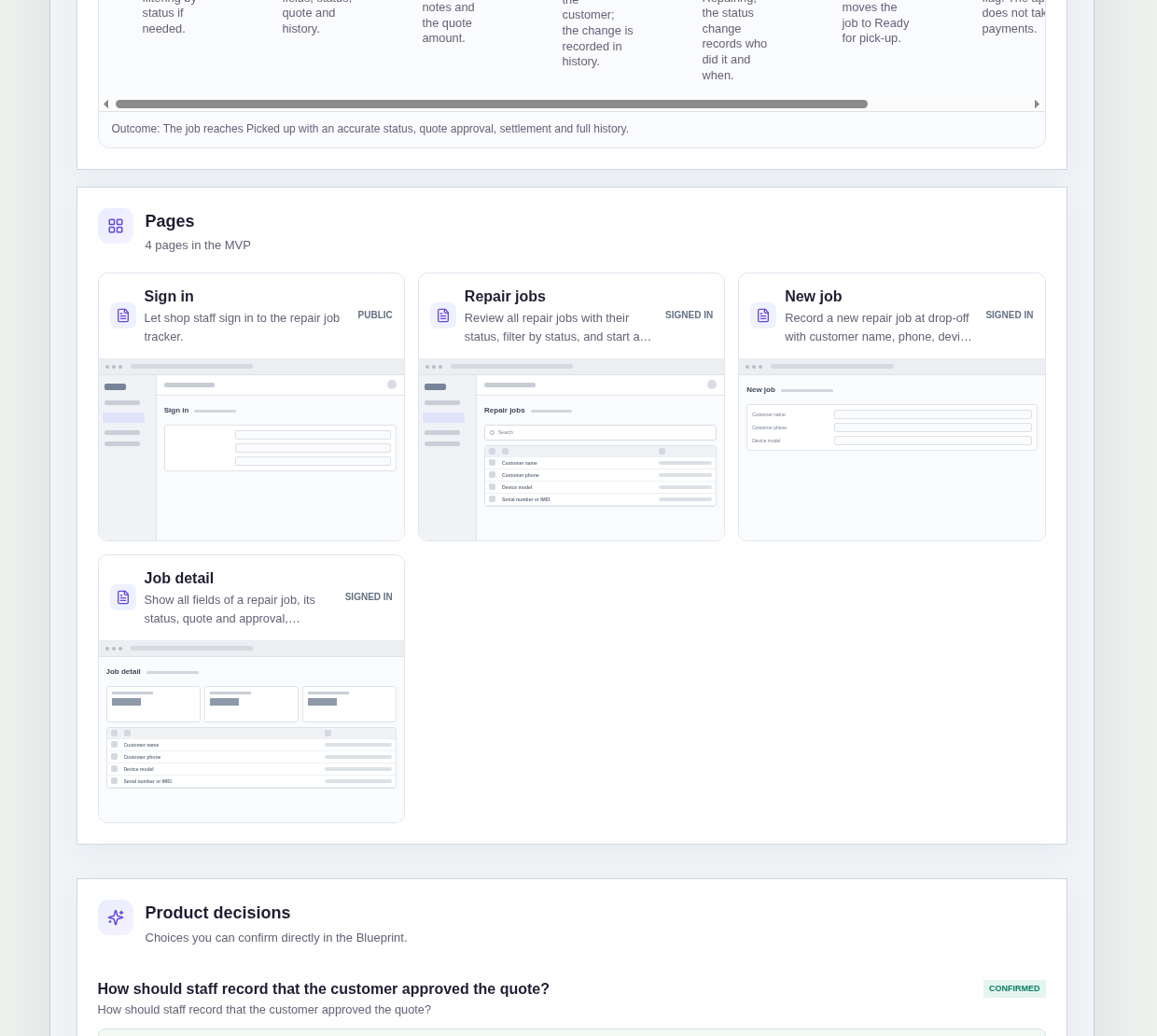
It has four pages:
- Sign in: so every change can be tied to the staff member who made it
- Repair jobs: every job with its status, a search field, a filter by status, and a way to start a new job
- New job: records the customer name, customer phone, device model, serial number or IMEI, condition at drop-off and reported problem
- Job detail: all fields of one job, its status, quote and approval, settlement, and the full history of changes
A repair job holds the customer and device details, the condition at drop-off, the reported problem, diagnosis notes, a quote amount, a quote approval flag, a settled yes/no flag and a status.
A new job starts as Received and ends as Picked up, passing through statuses such as Repairing and Ready for pick-up.
Sample data.
Paper claim tickets fail a small repair shop in a few predictable ways.
A repair starts before the customer has agreed to the quote.
A device goes back to the customer before anyone has been paid.
Nobody can say who changed a ticket, or what it said before.
The rules below keep each job's quote, approval, settlement and history straight.
Example scenario: a customer drops off a laptop with a cracked hinge. The technician creates a job with the device model, serial number, the condition "scuffed lid, left corner dented" and the reported problem, and it is saved as Received. After diagnosis, the technician adds a quote, and when the customer agrees, marks the quote approved. Only then does the job move to Repairing.
Here is how the app is set up.
The condition is written down at drop-off.
The new job step records the device model, the serial number or IMEI and the condition at drop-off, together with the customer and the reported problem.
When a customer later questions a scratch, the shop can open the job and read what was noted when the device came in.
No repair starts until the customer approves the quote.
A job cannot move to Repairing until staff mark the quote as approved by the customer.
That prevents the classic dispute where the work is done and the customer says they never agreed to the quote.
Approval is a simple flag, and history records who set it.
Staff toggle an approved flag on the job, and the history records who set it and when.
This was a confirmed product decision in the sample.
A device is only marked Picked up after the job is settled.
Staff record settlement as a simple yes or no.
The app does not take or process payments; it only records that the job was settled.
A job cannot be marked Picked up until it is settled, so a device does not leave the shop unpaid by mistake.
Status only moves forward.
A job can move to any later status, but never back to an earlier one, subject to the approval and settlement rules.
This was a confirmed product decision in the sample.
A finished job cannot quietly slip back into the queue, and the status always reflects how far the device has got.
Every status change records who did it and when.
Each status change is saved with the signed-in staff member and the date and time.
When two people share the bench, either of them can see who moved a job and when, without asking.
History cannot be edited or deleted.
Creating the job, approving the quote and every status change are kept in a history on the job detail page.
History entries can never be edited or deleted, so the record of what happened stays the same as the day it was written.
Search and filter find a job at the counter.
The repair jobs list has a search field and a filter by status.
When a customer walks in, staff can find their job quickly, or pull up everything that is ready for pick-up.
How do I track repair jobs in a small repair shop without paper tickets?
Record every device as a repair job at drop-off and keep its status, quote and history in one shared place.
In this sample, staff sign in, create a job with the customer, device model, serial number or IMEI, condition and reported problem, and then move it forward from Received to Picked up.
Every status change records who made it and when.
How can a repair shop show what condition a device was in at drop-off?
Write the condition into the job when the device is checked in, alongside the device model and serial number or IMEI.
In this sample, the new job step records the condition at drop-off as part of the job.
Because the job keeps a history of changes that cannot be edited or deleted, staff can look back at what was recorded and who recorded it.
Can a repair job be marked picked up before the customer pays?
No, not in this sample.
A job can only be marked Picked up after staff record it as settled.
Settled is a simple yes or no that staff set by hand, because the app does not take or process payments.
The status change to Picked up is recorded with who made it and when, so the hand-back is on record.
Can I build a repair shop job tracker without coding?
Yes, for a simple internal tracker in a small shop.
With IdeaMade, you describe your roles, job fields, statuses and rules in plain language.
IdeaMade turns that into a blueprint you can review and change before anything is built.
Then you build the app, preview it with test data, and check the approval and settlement rules before your shop relies on it.
Copy this prompt, change the parts in brackets, and paste it into the blueprint generator:
Build a repair job tracker for [a two-person phone and computer repair shop] that replaces paper claim tickets. Staff sign in. Roles: [Shop owner] and [Technician], both with full access. Pages: Sign in; Repair jobs (list with status, search, filter by status, start a new job); New job (customer name, customer phone, device model, serial number or IMEI, condition at drop-off, reported problem); Job detail (all fields, status, diagnosis notes, quote amount, quote approval, settlement and full history). A new job starts as Received. Status can move forward to any later status, never backward. A job cannot move to Repairing until staff mark the quote as approved by the customer. A job can only be marked Picked up after staff mark it as settled; settled is a recorded yes/no and the app takes no payments. Every status change records who did it and when. History entries can never be edited or deleted.
Your idea, made real.