In a small cafe, the weekly schedule lives in a spreadsheet that only the manager understands.
On Saturday morning there is a cashier on the floor but no barista, and someone who closed late on Friday is back to open a few hours later.
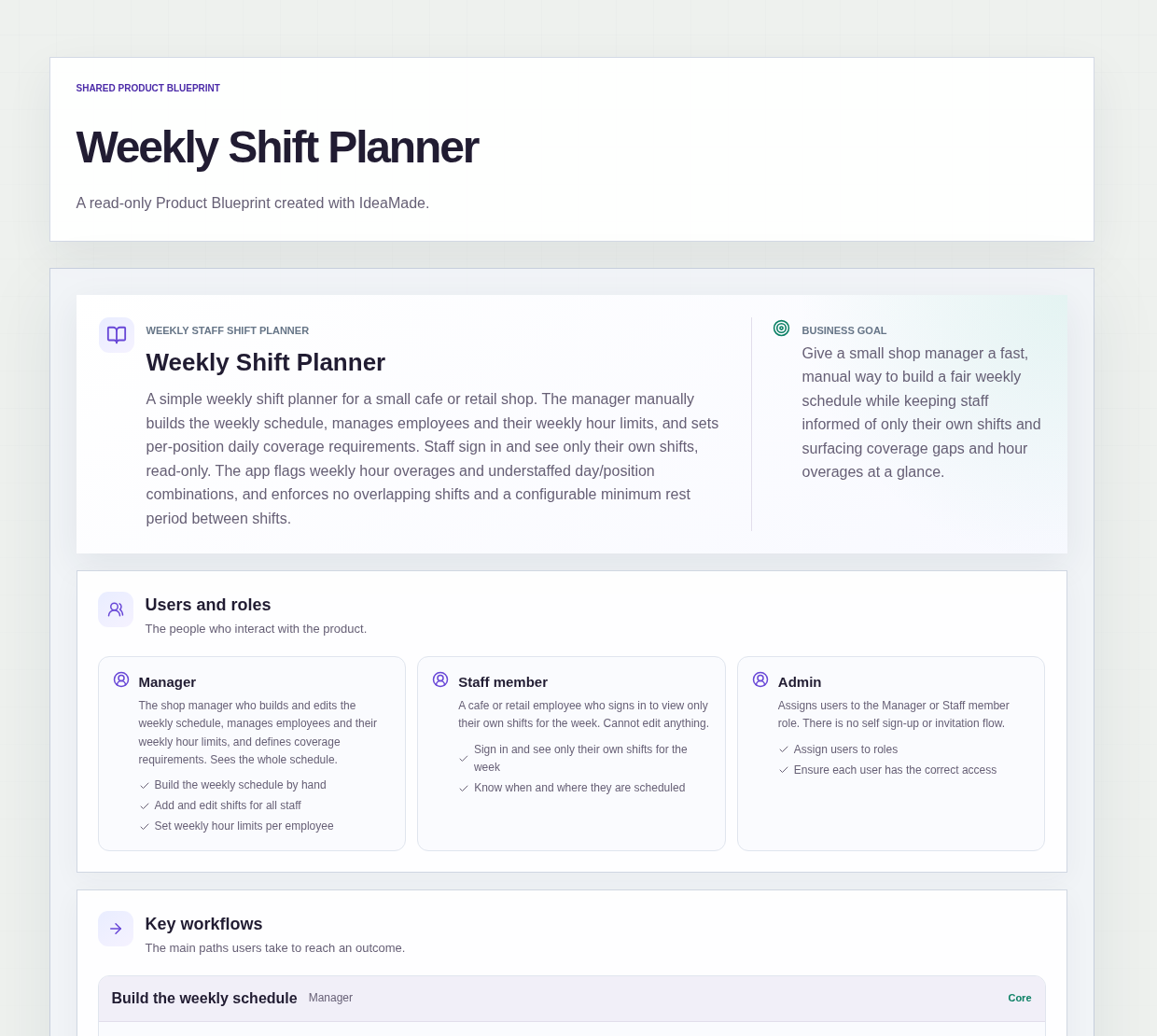
This sample blueprint is a simple staff shift planner: the manager builds the week by hand, the app blocks shifts that clash, and it shows hour overages and understaffed days at a glance.
Who this is for
- Managers of small cafes who build the weekly schedule themselves
- Owners of small retail shops who want a simple shift schedule without a spreadsheet
- Staff who want to check their own shifts for the week
- Small teams where one person plans everyone's hours
Sample blueprint, read-only. Open it with no sign-in. Select "Build this app with IdeaMade" at the bottom to open it in the blueprint editor, where you can change it and continue.
Building the app requires signing in.
The sample is a weekly shift planner with three roles.
- Manager: builds and edits the weekly schedule, manages employees and their weekly hour limits, defines coverage requirements, and sees the whole schedule
- Staff member: signs in to see only their own shifts for the week and cannot edit anything
- Admin: assigns users to the Manager or Staff member role
There is no self sign-up or invitation flow.
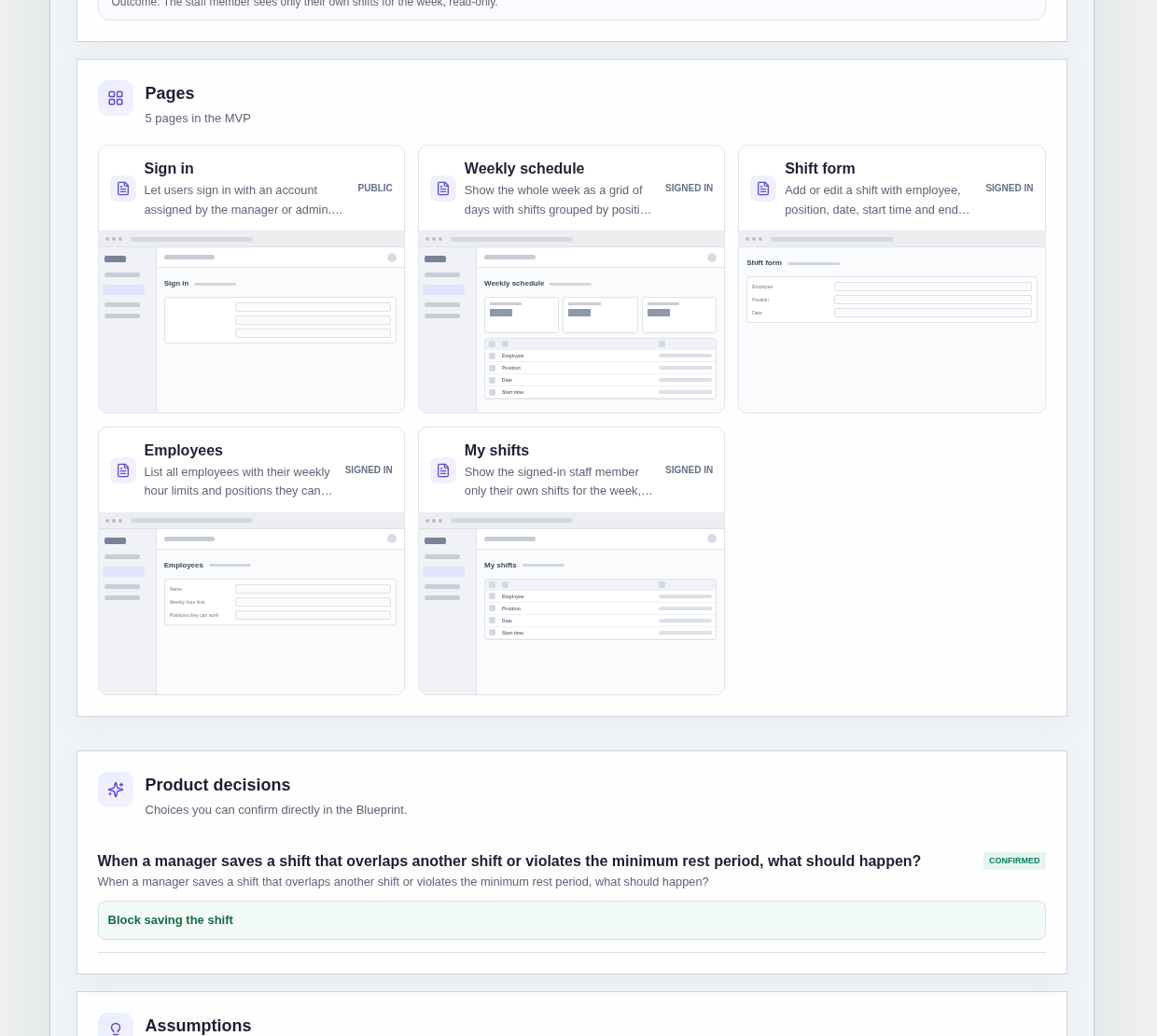
It has five pages:
- Sign in: for users with an account assigned by the manager or admin
- Weekly schedule: the whole week as a grid of days with shifts grouped by position, where the manager adds and edits shifts, sets coverage requirements and the minimum rest period, and sees hour overages and understaffing
- Shift form: add or edit a shift with employee, position, date, start time and end time
- Employees: every employee with their weekly hour limit and the positions they can work, which the manager can add or edit
- My shifts: the signed-in staff member's own shifts for the week, read-only
A shift has an employee, a position, a date, a start time and an end time.
An employee has a name, a weekly hour limit and the positions they can work.
A coverage requirement says how many people are needed per position per day.
Sample data.
Building shifts by hand tends to go wrong in the same few ways.
One person ends up booked in two places at once.
Someone closes late and opens early the next morning with almost no rest.
A part-timer quietly drifts past the hours they agreed to.
A day has enough people in total but nobody for one position.
The rules below catch each of these while the manager is still building the week.
Example scenario: the manager sets a coverage requirement of one barista and one cashier for Saturday. Only a cashier shift is scheduled, so Saturday shows as understaffed for the barista position. The manager then tries to give the Friday closer a Saturday opening shift that starts too soon after Friday's shift ends. Saving is blocked until the shift is moved.
Here is how the app is set up.
No employee can have two overlapping shifts.
Saving a shift is blocked when it overlaps another shift of the same employee.
That prevents one person from being scheduled at the counter and on the floor at the same time.
There is a minimum rest period between shifts.
Saving is blocked when a shift leaves less than the minimum rest period after or before another shift of the same employee.
The minimum rest period defaults to 10 hours, and the manager can change it.
That prevents a late close followed by an early open.
Conflicts block saving rather than warn.
When a shift overlaps another shift or violates the minimum rest period, it cannot be saved until the conflict is resolved.
This was a confirmed product decision in the sample.
Weekly hour overages are shown in red.
Each employee has a weekly hour limit.
When their scheduled hours for the week go over that limit, the overage is shown in red on the weekly schedule.
The manager sees it while building the week, not after the week has been worked.
Understaffed days are flagged.
The manager defines how many people are needed per position per day.
When a day and position has fewer people scheduled than that, the weekly schedule shows it as understaffed.
That makes a missing barista visible even when the day looks busy overall.
Staff see only their own shifts.
A signed-in staff member sees only their own shifts for the week, read-only.
They know when and where they are scheduled without seeing everyone else's hours, and they cannot change the schedule.
Roles are assigned, not self-chosen.
An admin assigns each user to the Manager or Staff member role.
There is no self sign-up or invitation flow, so only people given an account can see the schedule.
How do I make a simple shift schedule for a small business without a spreadsheet?
Use a staff shift planner where each shift is a record with an employee, a position, a date, a start time and an end time.
The manager builds the week on a grid of days, and the app checks every shift as it is saved.
Overlapping shifts and shifts with too little rest are blocked, and weekly hour overages and understaffed days are shown on the schedule.
How do I stop scheduling someone to close and then open the next morning?
Set a minimum rest period between two shifts of the same employee.
In this sample it defaults to 10 hours, and the manager can change it.
When a new shift would start too soon after that employee's previous shift ends, saving is blocked until the shift is moved or given to someone else.
The same check blocks two overlapping shifts for one person.
How can I see when a day is understaffed?
Define a coverage requirement: how many people are needed per position per day, such as one barista and one cashier on Saturday.
The weekly schedule compares the shifts scheduled for each day and position with that requirement.
When fewer people are scheduled than needed, that day and position is shown as understaffed, so the manager can fill the gap before the week starts.
Can staff see the whole schedule?
No.
In this sample, a staff member signs in and sees only their own shifts for the week, read-only.
The manager sees and edits the whole schedule, and an admin assigns each user to the Manager or Staff member role.
There is no self sign-up or invitation flow, so only people with an assigned account can sign in.
Copy this prompt, change the parts in brackets, and paste it into the blueprint generator:
Build a weekly staff shift planner for [a small cafe]. Roles: Manager, who builds and edits the weekly schedule, manages employees and weekly hour limits, and sets coverage requirements; Staff member, who signs in and sees only their own shifts, read-only; and Admin, who assigns users to roles. No self sign-up or invitations. An employee has a name, a weekly hour limit and positions they can work, such as [Barista and Cashier]. A shift has an employee, position, date, start time and end time. Coverage requirement: how many people are needed per position per day. Block saving a shift that overlaps another shift of the same employee or leaves less than the minimum rest period, which defaults to [10] hours and is editable by the manager. Show weekly hour overages in red and flag understaffed day and position combinations. Do not add [notifications, a time clock, shift swaps, payroll or automatic scheduling].
Your idea, made real.