By Thursday, three custom cakes for Saturday have been agreed in three different direct message threads.
Friday night, one customer switches from vanilla to lemon, and you scroll back to find what size they ordered.
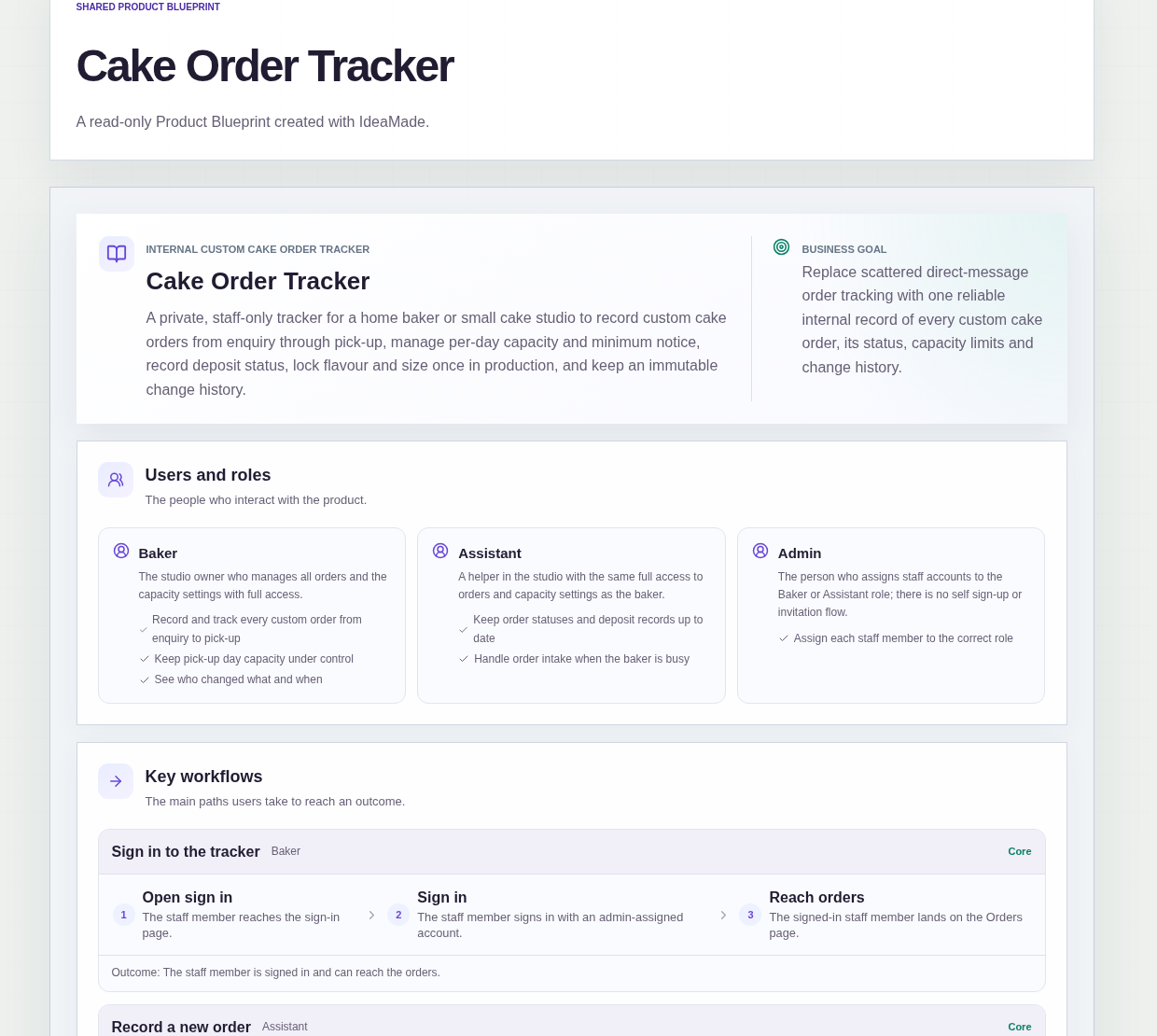
This sample blueprint is a custom cake order tracker: every order becomes one record that moves from enquiry to pick-up, each pick-up day has a limit, and flavour and size are locked once a cake is in production.
Who this is for
- Home bakers who take custom cake orders through direct messages
- One- or two-person cake studios where both people take orders
- Bakers who want a firm limit on how many cakes they accept for one day
Sample blueprint, read-only. Open it with no sign-in. Select "Build this app with IdeaMade" at the bottom to open it in the blueprint editor, where you can change it and continue.
Building the app requires signing in.
The sample is a private, staff-only tracker, and staff sign in to use it.
It has three roles:
- Baker: the studio owner, who manages all orders and the capacity settings with full access
- Assistant: a helper with the same full access as the baker, who keeps statuses and deposit records up to date
- Admin: the person who assigns each staff account to the Baker or Assistant role
There is no self sign-up or invitation flow.
The blueprint assumes the admin assigns roles outside the tracker's own screens, and marks that assumption for confirmation.
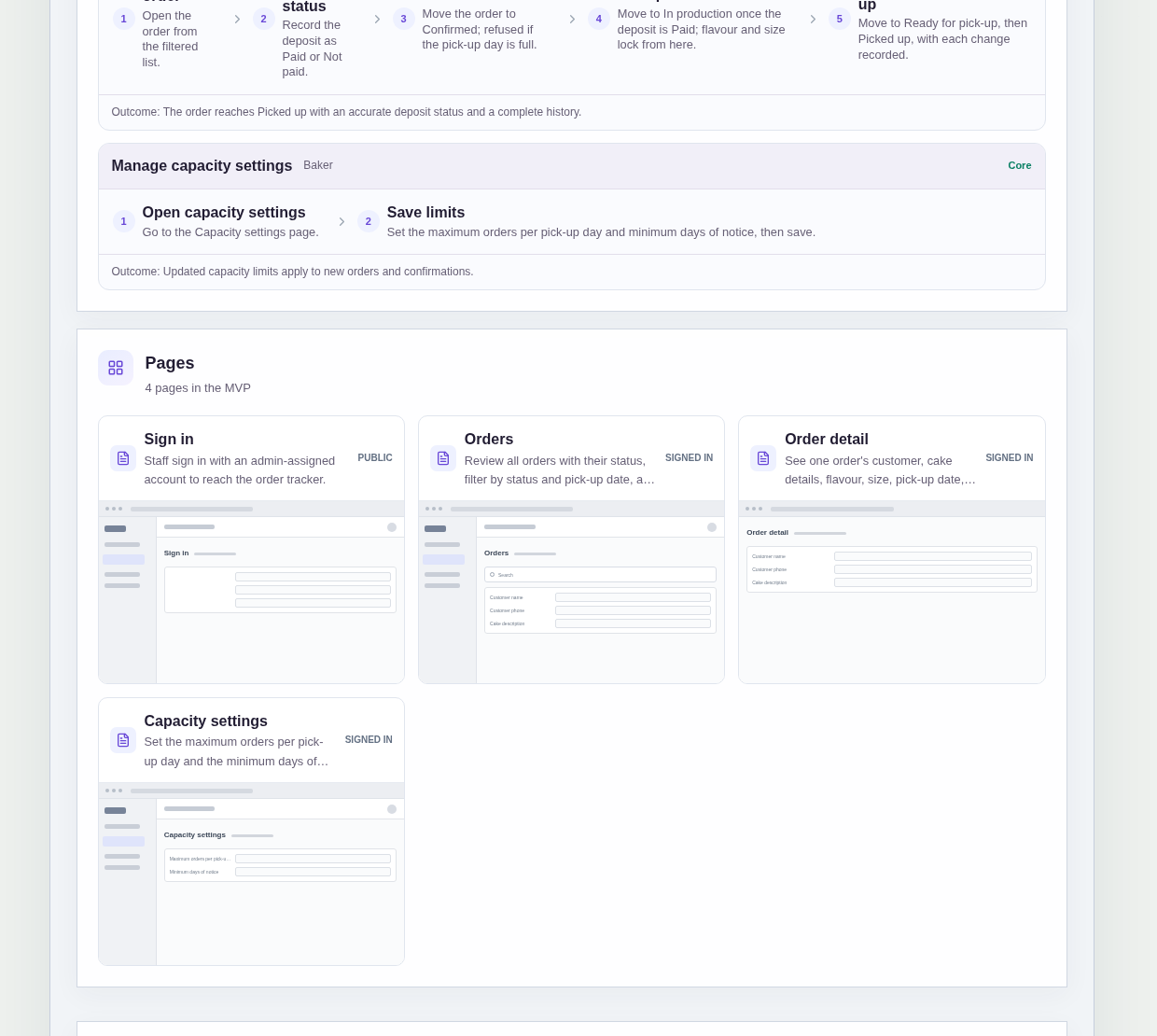
It has four pages:
- Sign in: staff sign in with an account the admin assigned
- Orders: every order with its status, search, filters by status and pick-up date, and a way to create a new order
- Order detail: one order's full details, deposit status, status and history, where staff update details, record the deposit and change the status
- Capacity settings: the maximum number of orders per pick-up day and the minimum days of notice
An order records the customer name and phone, a cake description, flavour, size, pick-up date, price, deposit status and status.
An order is saved as an Enquiry and moves through Confirmed, In production and Ready for pick-up to Picked up.
Sample data.
When orders live in direct messages, the same problems return every busy weekend.
You say yes to one cake too many for a single day.
A cake for tomorrow is written down before anyone checks the date.
A flavour changes after the sponge is baked.
The rules below put a limit, a date check and a lock around those moments.
Example scenario: a customer asks on Monday for a chocolate cake for Saturday. The assistant saves it as an Enquiry, records the deposit as Paid when it arrives, and confirms the order, which takes one of Saturday's slots. When the baker moves it to In production, the flavour and size lock.
Here is how the app is set up.
Each pick-up day has a maximum number of orders.
The baker sets the maximum orders per pick-up day on the Capacity settings page.
When a day is full, confirming another order for that day is refused.
Orders count toward the limit from Confirmed onward.
An order takes a slot when it is confirmed and keeps it through In production, Ready for pick-up and Picked up.
This was a confirmed product decision in the sample.
Enquiries do not take a slot, so you can note interest without filling the day.
A pick-up date that is too soon cannot be saved.
The Capacity settings page also holds the minimum days of notice.
When an order is created, a pick-up date that breaks that notice cannot be saved at all.
This was a confirmed product decision in the sample.
A rush request is caught when it is entered, not the day before pick-up.
Production starts once the deposit is recorded as Paid.
Staff record the deposit status on the order as Paid or Not paid.
In the sample's workflow, an order moves to In production once the deposit is Paid.
The deposit is only a recorded status; the app does not take payments.
Flavour and size lock once a cake is in production.
From In production onward, the order's flavour and size are locked.
A late message asking for lemon instead of vanilla cannot quietly change an order after the baking has started.
Each order keeps its change history.
Each change on the way to Picked up is recorded, and the order detail page shows the full history.
The blueprint describes it as an immutable change history, so the baker can see who changed what and when.
Filters show what is due.
The orders list can be searched and filtered by status and by pick-up date, so on a Friday the baker can pull up everything due on Saturday.
How do I track custom cake orders that come in through direct messages?
Give every cake order one record with the customer, cake description, flavour, size, pick-up date, price, deposit status and status.
In this sample, staff save each new order as an Enquiry, then move it through Confirmed, In production and Ready for pick-up to Picked up.
Filters by status and pick-up date replace scrolling through threads.
How do I limit how many cake orders I take for one day?
Set a maximum number of orders per pick-up day and refuse confirmations once a day is full.
In this sample, the baker sets that maximum on the Capacity settings page.
Orders count toward the limit from Confirmed onward, including In production, Ready for pick-up and Picked up.
Can a cake order go into production before the deposit is paid?
Not in this sample's workflow.
Staff record the deposit as Paid or Not paid on the order, and the order moves to In production once the deposit is Paid.
The deposit is only a recorded status, because the app does not take payments.
Once the order is In production, its flavour and size are locked, so a late change request cannot alter a cake already being made.
Can I build a cake order tracker without coding?
Yes, for a simple internal tracker for a small studio.
With IdeaMade, you describe your roles, order fields, statuses, daily limit and notice rule in plain language.
IdeaMade turns that into a blueprint you can review and change before anything is built.
Then you build the app, preview it with test orders, and check the rules before you rely on it.
Copy this prompt, change the parts in brackets, and paste it into the blueprint generator:
Build a custom cake order tracker for [a home baker or a two-person cake studio] who takes orders in direct messages. Staff sign in. Roles: [Baker] and [Assistant], both with full access; an admin assigns staff accounts to roles, with no self sign-up or invitations. Pages: Sign in; Orders (search, filters by status and pick-up date, new order); Order detail (customer name and phone, cake description, flavour, size, pick-up date, price, deposit status, status, history); Capacity settings (maximum orders per pick-up day, minimum days of notice). New orders are saved as Enquiry, then move to Confirmed, In production, Ready for pick-up and Picked up. Orders from Confirmed onward count toward the daily maximum, and confirming is refused when the day is full. A pick-up date that breaks the minimum notice cannot be saved. Deposit status is a recorded Paid or Not paid, with no payments, and an order moves to In production once the deposit is Paid. Flavour and size lock once the order is In production. Keep a change history for each order.
Your idea, made real.