A prospective client emails you on Monday, another fills a LinkedIn message on Tuesday, and a third arrives as a voice note from a referral.
By Friday the details live in three inboxes, and you cannot say which request you already declined.
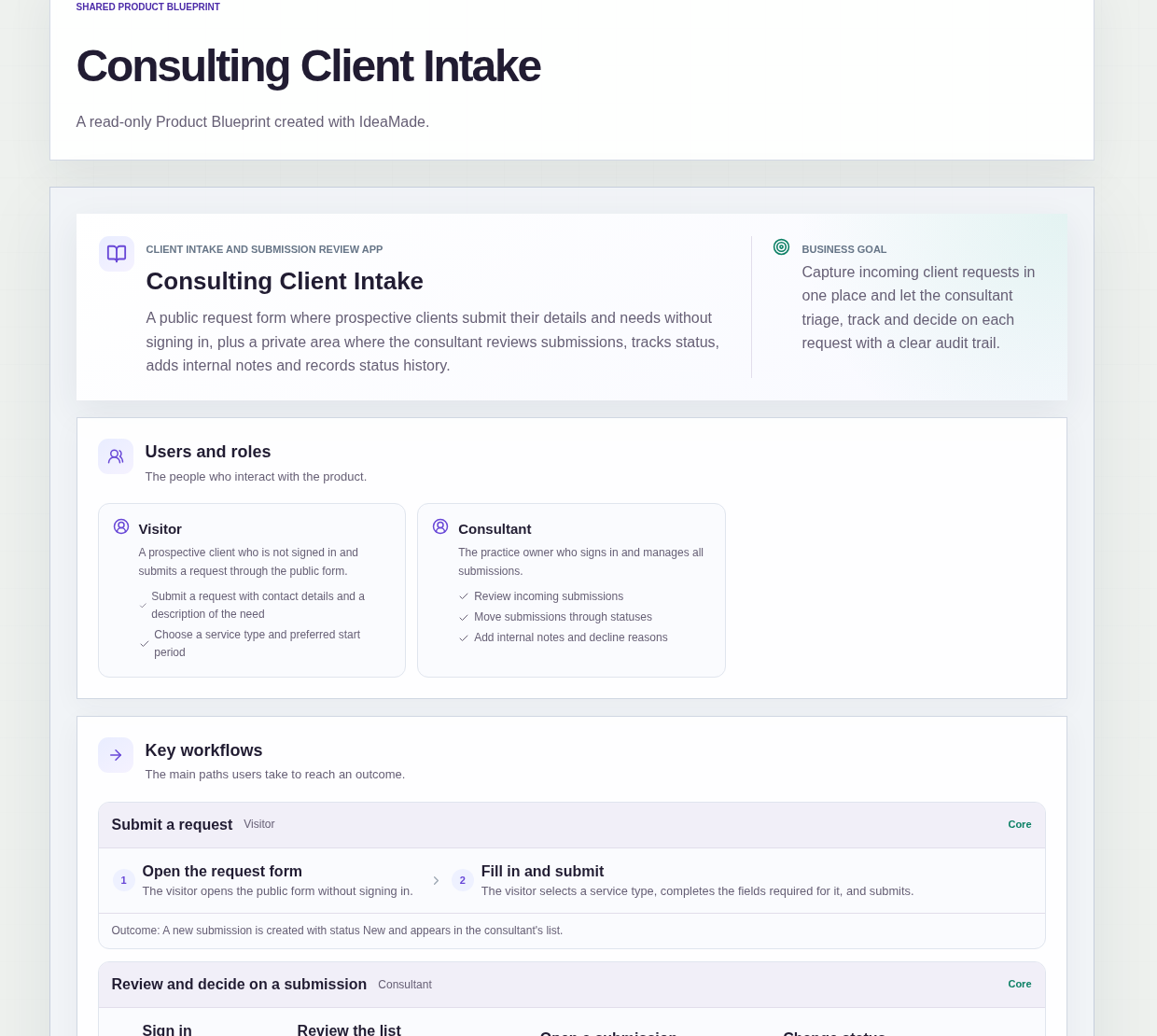
This sample blueprint is a client intake form app for an independent consultant: visitors submit on a public form without signing in, and you review each request in one internal list with status, notes and a clear history.
Who this is for
- Independent consultants who take new work requests by email or chat today
- Small design or marketing studios that need one place for incoming briefs
- Coaches who want a simple request form before a first call
- Anyone who needs to accept or decline client requests with a recorded reason
Sample blueprint, read-only. Open it with no sign-in. Select "Build this app with IdeaMade" at the bottom to open it in the blueprint editor, where you can change it and continue.
Building the app requires signing in.
The sample has a public side for prospective clients and a signed-in side for the consultant.
It has two roles:
- Visitor: a prospective client who is not signed in and only submits the public request form
- Consultant: the practice owner who signs in, reviews submissions, changes status, and maintains service types
Only one consultant account is in scope for the first version.
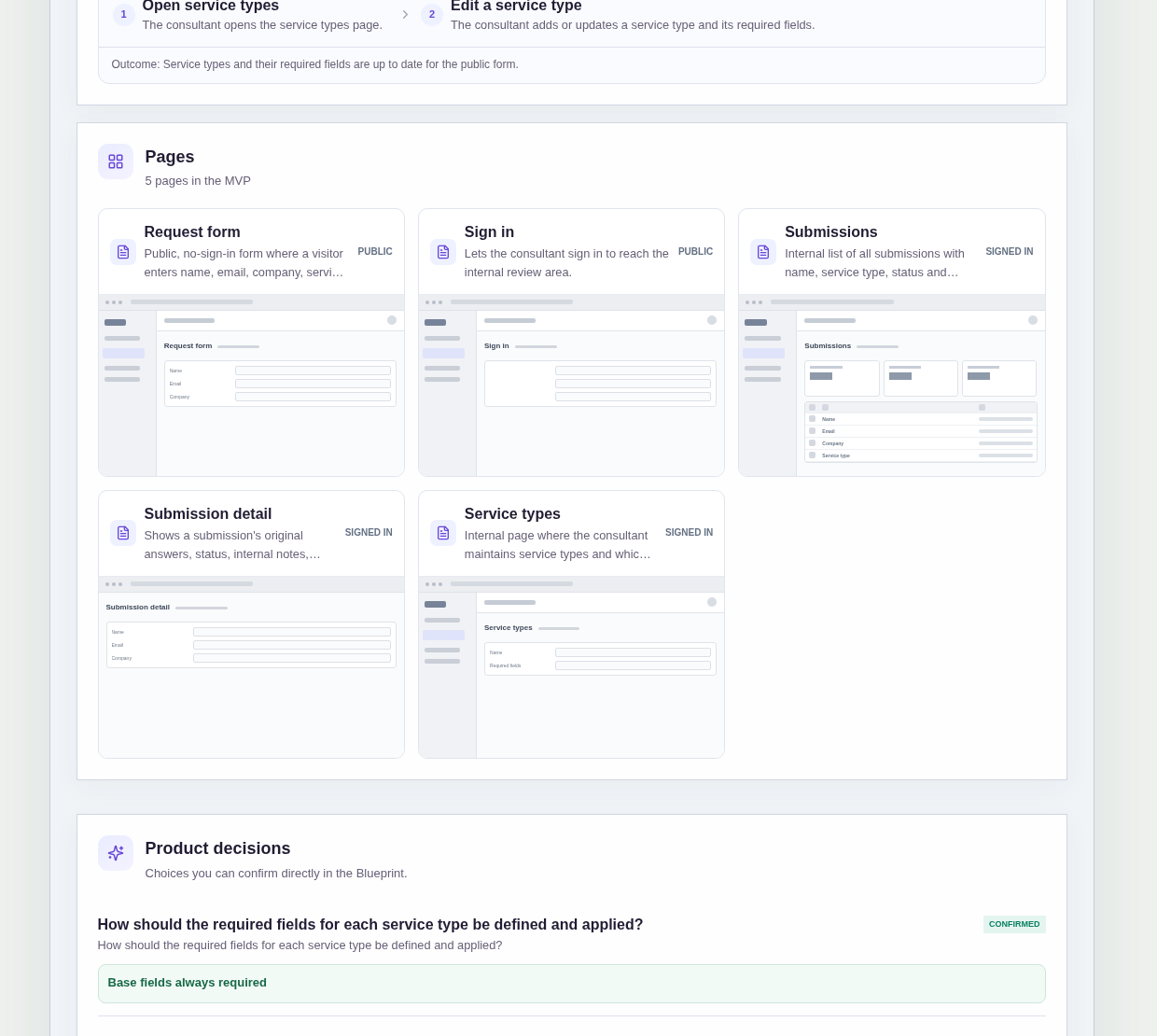
It has five pages:
- Request form (public): name, email, company, service type, description of the need and preferred start period; required fields adjust to the selected service type
- Sign in (public): so the consultant can reach the internal review area
- Submissions: every submission with name, service type, status and submitted date, filterable by status, with duplicate-email flags
- Submission detail: the original answers, status, internal notes, decline reason and status history, where the consultant changes status and adds notes
- Service types: where the consultant maintains service types and which request form fields are required for each
A new submission is created with status New and appears in the consultant's list.
Name, email, company, description and preferred start period are always required; the selected service type adds extra required fields.
Sample data.
When client requests arrive as scattered messages, the same problems come back every week.
You cannot tell which email already became a declined lead.
Two messages from the same person look like two different prospects.
A decline happens in a chat, and later nobody remembers why.
The rules below put every request in one list with a status you can change and a history you can trust.
Example scenario: a visitor opens the public form, picks Strategy workshop as the service type, fills the base fields plus the extra fields that type requires, and submits. The submission appears as New. The consultant filters the list, opens the detail, adds an internal note, and later moves it to accepted or declined. If declined, a decline reason is required and stays on the record.
Here is how the app is set up.
Required fields follow the selected service type.
Base fields are always required on the request form.
When the visitor selects a service type, that type's extra required fields are added.
The consultant keeps those definitions current on the Service types page, so each kind of request gathers the details that matter for it.
New submissions start as New.
When a visitor submits the form, a submission is created with status New and appears in the Submissions list.
Nothing sits only in an inbox; every request has a first status the consultant can see.
The consultant can move a submission to any status at any time.
This was a confirmed product decision in the sample.
Intake does not always move in a straight line, so a submission is not forced through a fixed sequence.
The consultant chooses the next status from the detail page when the decision is ready.
Declined always requires a decline reason.
A submission cannot be moved to Declined without a decline reason.
The reason stays on the detail page with the status history, so a later look-back shows why that request was turned down.
Duplicate emails are flagged on the list.
When a new submission uses an email that already has a submission, the list shows a duplicate-email flag.
Both records stay visible, so the consultant can open them together and decide what to do.
Every status change is recorded in the status history.
The Submission detail page shows the status history alongside the original answers, internal notes and decline reason.
The consultant can answer when a request arrived and how its status changed without searching old messages.
One consultant account signs in for the internal area.
Sign-in reaches the Submissions, Submission detail and Service types pages.
The sample assumes a single consultant account; multi-consultant access is out of scope for the first version.
What should a client intake form for consultants include?
A client intake form for consultants should collect name, email, company, service type, a description of the need and a preferred start period on a public form that needs no sign-in.
In this sample, base fields are always required, and the selected service type adds extra required fields.
The consultant reviews every submission in an internal list with status, notes and a status history.
How do I triage client requests without losing them in email?
Give each request one submission record with a status, then review them in a single list you can filter.
In this sample, new submissions start as New, the Submissions list shows name, service type, status and submitted date, and the detail page holds original answers, internal notes, decline reason and status history.
The consultant can move a submission to any status at any time.
How do I handle two requests from the same email address?
Keep both submissions and flag the duplicate email so you can open them together.
In this sample, a new submission from an email that already has a submission is flagged on the Submissions list.
The records are not merged; the consultant decides how to treat each one.
Can I build a client intake form app without coding?
Yes, for a simple intake app with a public form and one signed-in consultant.
With IdeaMade, you describe the request fields, service types, statuses and rules in plain language.
IdeaMade turns that into a blueprint you can review and change before anything is built.
Then you build the app, preview it with test submissions, and check the required-field and decline-reason rules before you rely on it.
Copy this prompt, change the parts in brackets, and paste it into the blueprint generator:
Build a simple client intake web app for [an independent consulting practice]. Anyone can open a public request form without signing in and submit name, email, company, service type, a short description of the need and a preferred start period. Required fields depend on the selected service type; base fields are always required and each service type can add extra required fields. The consultant signs in, reviews submissions in an internal list (name, service type, status, submitted date, filter by status, duplicate-email flags) and opens a detail page with original answers, status, internal notes, decline reason and status history. New submissions start as New. The consultant can move a submission to any status at any time; Declined always requires a decline reason. There is a Service types page to maintain types and their required fields. Only one consultant account. No file uploads, reminders, e-signatures, deposits or payments, no AI.