A client pays half of an invoice, and you add a note to a spreadsheet cell.
A month later you are not sure whether the rest arrived, which invoices are late, or how much you are still owed in total.
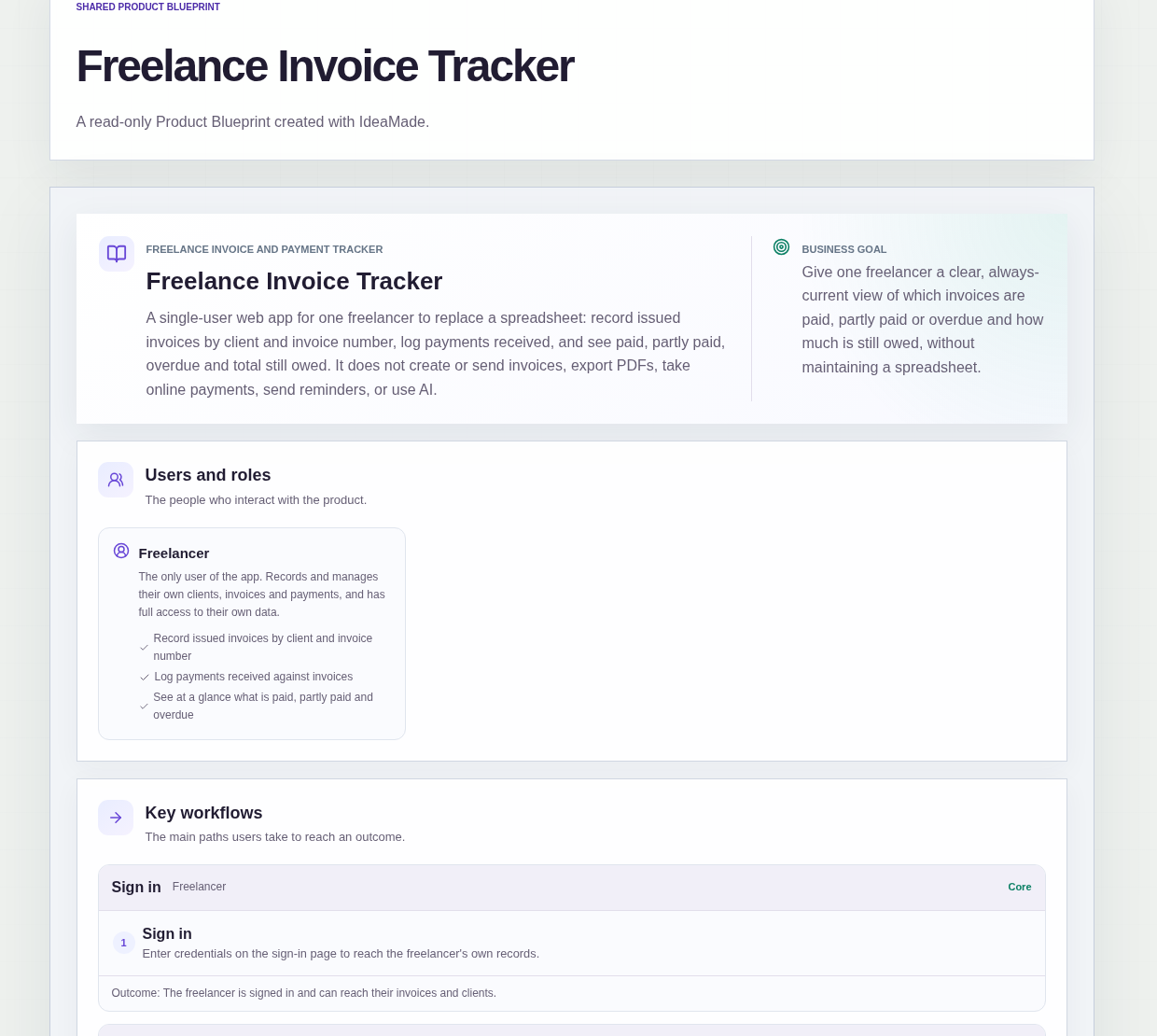
This sample blueprint is an invoice tracker for one freelancer: you record each invoice you have issued, log every payment received, and the app shows what is paid, partly paid, overdue and still owed.
Who this is for
- Freelance designers who send invoices from one tool and track payments in a spreadsheet
- Freelance developers with several clients paying on different terms
- Translators who get paid in parts and lose track of the balance
- Photographers who want to see which clients are late at a glance
Sample blueprint, read-only. Open it with no sign-in. Select "Build this app with IdeaMade" at the bottom to open it in the blueprint editor, where you can change it and continue.
Building the app requires signing in.
The sample is a single-user app for the freelancer, who signs in to use it.
There is one role:
- Freelancer: the only user, who records clients, invoices and payments and has full access to their own data
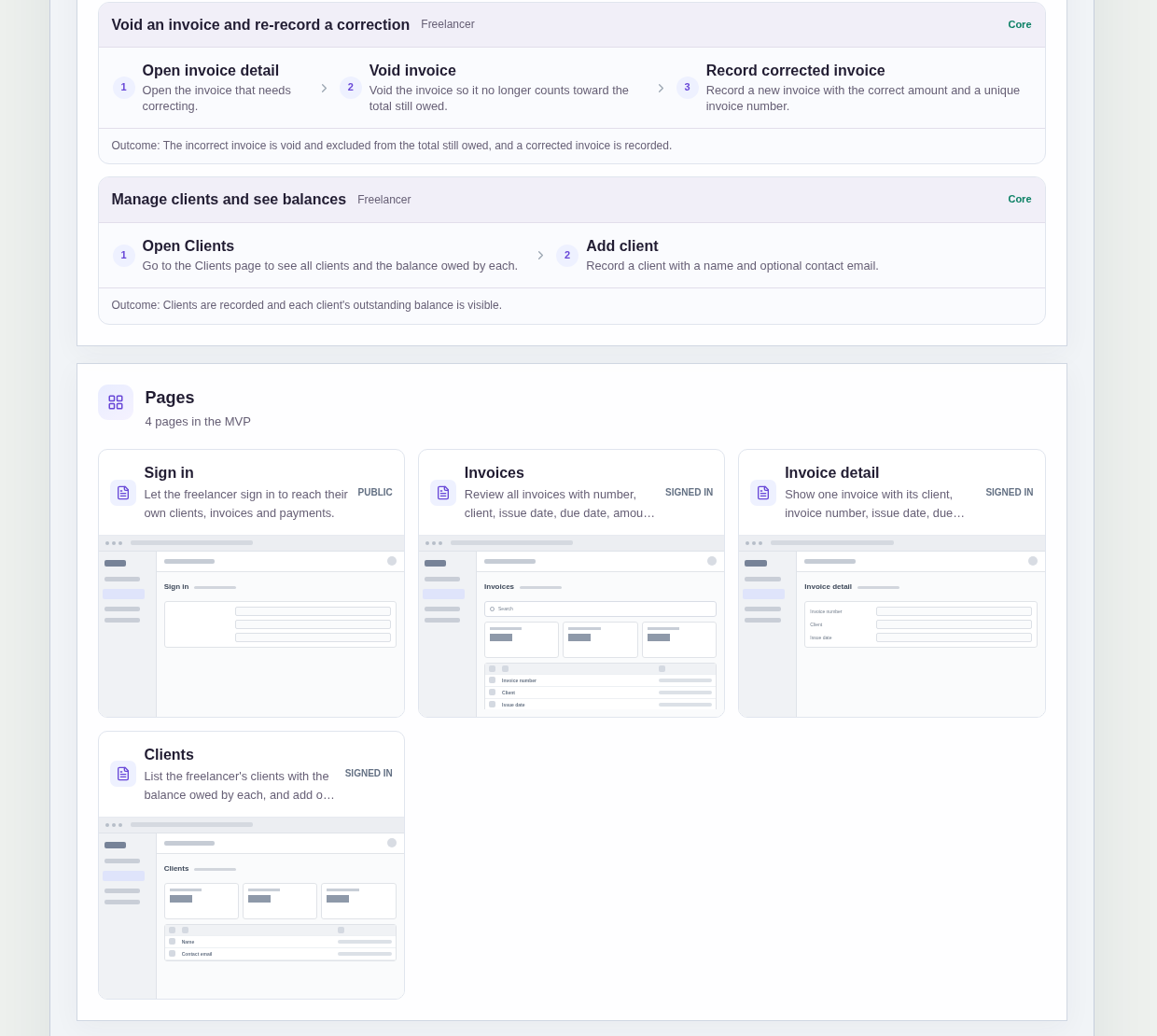
It has four pages:
- Sign in: so the freelancer's clients, invoices and payments stay private
- Invoices: every invoice with its number, client, issue date, due date, amount, amount paid, balance and status, a status filter, the total still owed at the top, and a way to record a new invoice
- Invoice detail: one invoice with its payments list and balance, where the freelancer logs a payment or voids the invoice
- Clients: every client with the balance they owe, and a way to add or edit a client
An invoice records the client, invoice number, issue date, due date and amount.
A payment records the amount and the date received.
A client has a name and an optional contact email.
Invoice statuses are Open, Partly paid, Paid, Overdue and Void.
Sample data.
A spreadsheet of invoices drifts in the same ways every month.
A payment is typed into the wrong row, or an amount is changed and nobody remembers why.
An invoice goes past its due date and still looks fine, because nobody updated the cell.
The rules below keep one record per invoice and let the balances follow from the payments.
Example scenario: a freelancer records invoice 1042 for a client, due at the end of the month. The client pays part of it, and the freelancer logs that payment on the invoice detail page. The invoice shows as Partly paid with the remaining balance. When the due date passes without the rest, the invoice shows as Overdue with the number of days late.
Here is how the app is set up.
Each invoice number can be recorded only once.
A duplicate invoice number is rejected when the freelancer records an invoice.
That prevents the same invoice from being entered twice and counted twice in the total still owed.
An invoice amount is fixed once it is recorded.
The amount cannot be changed after the invoice is saved.
If an amount was wrong, the freelancer voids the invoice and records a corrected one with a new, unique invoice number.
That prevents silent edits that make old balances impossible to explain.
A payment cannot be larger than the remaining balance.
When the freelancer logs a payment, an amount above what is still owed on that invoice is rejected.
That prevents a typo from turning an invoice into a negative balance.
An invoice becomes Paid when its balance reaches zero.
Each payment reduces the balance, and partial payments leave the invoice Partly paid.
When the last payment brings the balance to zero, the invoice shows as Paid, so nobody has to remember to update a status by hand.
Overdue status and days late are calculated when the list is opened.
In the sample, overdue invoices and the number of days late are worked out each time the Invoices list is opened, based on the current date.
There is no scheduled job and no reminder, so the list reflects today without anything running in the background.
A voided invoice keeps its payments for history.
This was a confirmed product decision in the sample.
If a voided invoice already had payments, they stay attached to it, but they no longer count toward balances or the total still owed.
That prevents a correction from erasing the record of money that arrived.
Balances are shown per client and in total.
The Invoices list shows the total still owed at the top, and the Clients page shows the balance owed by each client.
All amounts are in a single currency, with no currency conversion.
How do freelancers track paid and unpaid invoices?
Record every invoice you issue, log each payment against it, and let the balance follow from the payments.
In this sample, each invoice has a status of Open, Partly paid, Paid, Overdue or Void, and the Invoices list can be filtered by status.
The total still owed sits at the top of the list, so you see unpaid money without adding up spreadsheet cells.
How do I record a partial payment on an invoice?
Log the payment on the invoice with the amount and the date received.
In this sample, the balance drops by that amount and the invoice shows as Partly paid until the balance reaches zero, when it becomes Paid.
A payment larger than the remaining balance is rejected, so a typo cannot push an invoice below zero.
How do I see which invoices are overdue?
Compare each unpaid invoice's due date with today's date.
In this sample, the Invoices list does this every time it is opened, showing which invoices are overdue and how many days late each one is.
Nothing runs on a schedule and no reminders are sent, so you decide when and how to follow up with each client.
Does this invoice tracker create or send invoices?
No, it only tracks invoices you have already issued.
This sample does not create or send invoices, export PDFs, take online payments or send reminders.
You keep issuing invoices the way you do now, then record each one here with its client, number, dates and amount.
That keeps the tracker focused on one question: what has been paid and what is still owed.
Copy this prompt, change the parts in brackets, and paste it into the blueprint generator:
Build an invoice tracker for [a freelance designer] to replace a spreadsheet. The freelancer is the only user and signs in. Pages: Sign in; Invoices (number, client, issue date, due date, amount, amount paid, balance and status, filter by status, total still owed at the top, record a new invoice); Invoice detail (payments list and balance, log a payment, void the invoice); Clients (balance owed by each client, add or edit a client with name and optional contact email). Invoice numbers must be unique. The amount is fixed once recorded; corrections are made by voiding and recording a new invoice. A payment cannot exceed the remaining balance. An invoice becomes Paid when the balance reaches zero. Overdue status and days late are calculated when the list is opened. Voided invoices keep their payments for history but they do not count toward balances. Single currency [your currency]. It does not create or send invoices, export PDFs, take online payments or send reminders.
Your idea, made real.