A parent messages you on Sunday evening: "How many lessons are left on our package?"
The answer is somewhere in a notebook that started two terms ago, between crossed-out dates and a cancelled lesson you are not sure you counted.
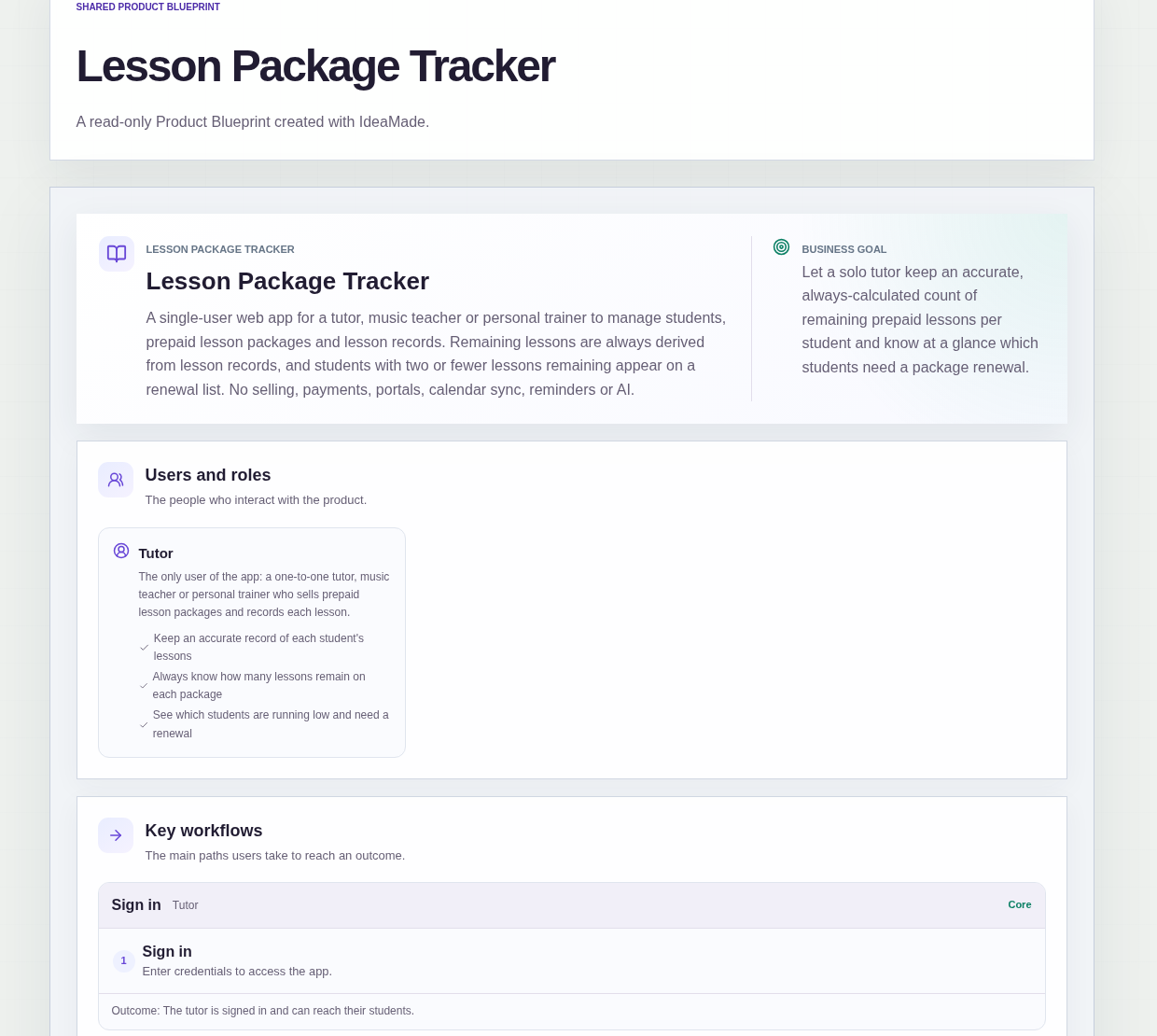
This sample blueprint is a lesson package tracker for an independent tutor: each student has one active prepaid package, every lesson is recorded against it, and the lessons remaining are always calculated from those records.
Who this is for
- Private tutors who sell packages such as 10 lessons and track them in a notebook or spreadsheet
- Music teachers who need to know which students are close to the end of a package
- Personal trainers who sell sessions in blocks and record each one
- Anyone who has to decide, lesson by lesson, whether a missed session counts
Sample blueprint, read-only. Open it with no sign-in. Select "Build this app with IdeaMade" at the bottom to open it in the blueprint editor, where you can change it and continue.
Building the app requires signing in.
The sample is a single-user app for the tutor, who signs in to use it.
There is one role:
- Tutor: the only user, who manages students, packages and lesson records, and checks who needs a renewal
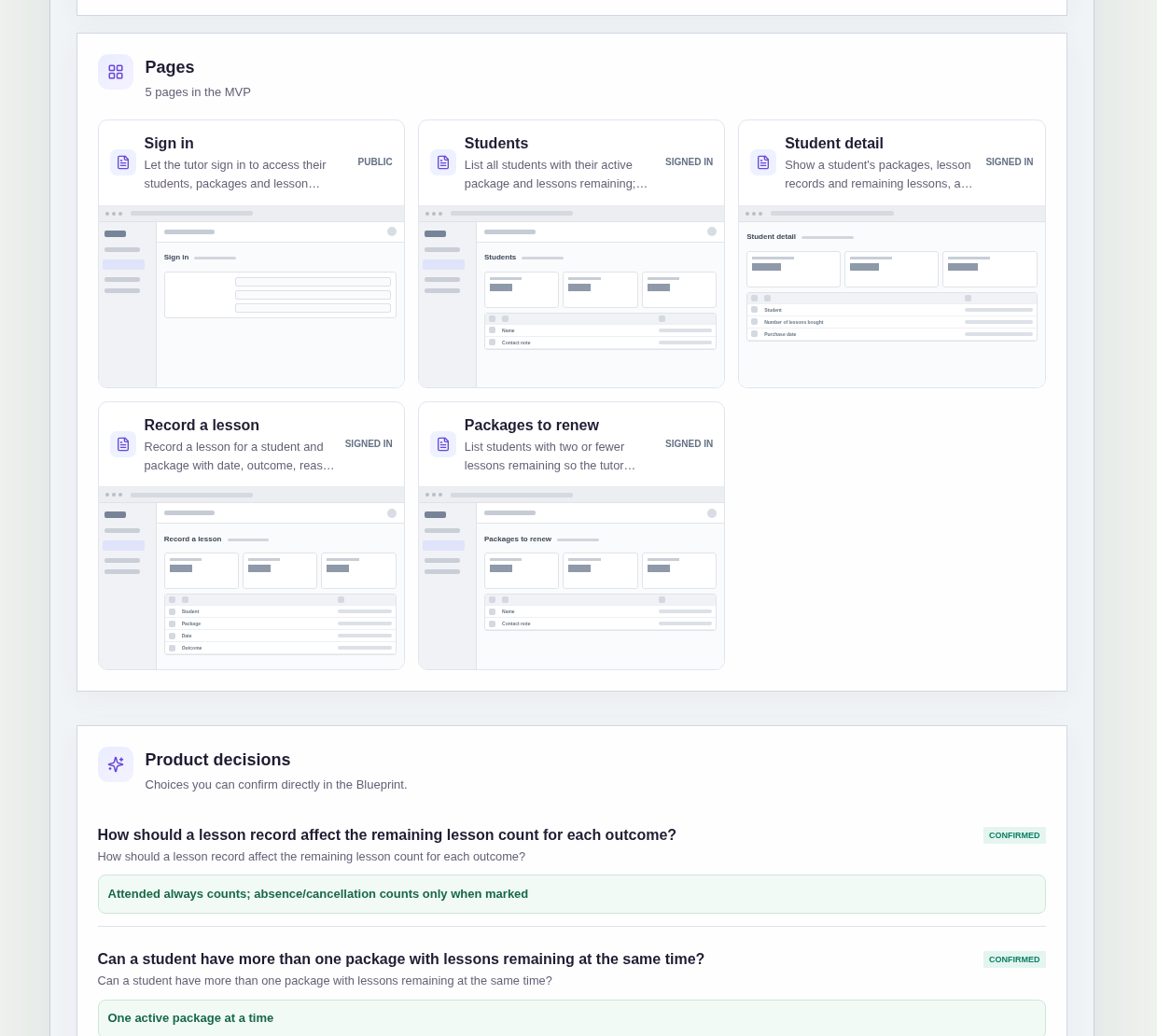
It has five pages:
- Sign in: so the tutor's students, packages and lesson records stay private
- Students: every student with their active package and lessons remaining, and a way to add a new student
- Student detail: one student's packages, lesson records and remaining lessons, where the tutor adds a new package
- Record a lesson: the student, the package, the date, the outcome, a reason for an absence or cancellation, and whether it counts against the package
- Packages to renew: the students with two or fewer lessons remaining, shown by name and contact note
A student has a name and a contact note.
A lesson package records the number of lessons bought and the purchase date.
A lesson record holds the student, the package, the date, the outcome, a reason and whether it counts against the package.
Sample data.
When a lesson balance lives in a notebook, the same questions come up every term.
A parent asks how many lessons are left, and you count tally marks to answer.
A student cancels at short notice, and later nobody remembers whether that lesson was deducted.
A package runs out, and the next lesson happens before anyone has talked about renewing.
The rules below give each lesson one record and let the count follow from the records.
Example scenario: a student buys a 10-lesson package. The tutor adds it on the student's detail page with the purchase date. After each lesson, the tutor records it as attended. One week the student is absent; the tutor writes the reason and decides it does not count. When two lessons remain, the student appears on the Packages to renew list.
Here is how the app is set up.
Lessons remaining are always calculated from lesson records.
The blueprint describes the remaining count as always derived from the lesson records.
When the tutor saves a lesson record, the package's remaining lessons are recalculated automatically.
The answer to "how many are left?" comes from the records, not from a number someone kept in their head.
Attended lessons always count against the package.
This was a confirmed product decision in the sample.
Every lesson recorded as attended reduces the remaining count, so a lesson that happened is never left off the balance.
An absence or cancellation counts only when the tutor marks it.
This was a confirmed product decision in the sample.
When a student is absent or a lesson is cancelled, the tutor records the reason and marks whether it counts against the package.
A late cancellation can be counted and a lesson the tutor cancelled can be left out, and the reason stays on the record for when a parent asks.
Each student has one active package at a time.
This was a confirmed product decision in the sample.
The blueprint assumes a new package is added only after the current one is used up.
That keeps the Students list simple: one active package and one remaining count per student.
The tutor chooses the package when recording a lesson.
This was a confirmed product decision in the sample.
On the Record a lesson page, the tutor selects the student and the package the lesson belongs to.
Every lesson record is tied to a specific package, so a student's history shows which lessons came out of which package.
Students running low appear on the Packages to renew list.
Students with two or fewer lessons remaining appear on the Packages to renew list, with their name and contact note.
It is only a list, and no reminders are sent.
The tutor sees who to talk to about a new package before the old one runs out.
How do tutors keep track of remaining lessons in a package?
Record every lesson against the student's package and calculate the remaining count from those records.
In this sample, the tutor records the date, outcome and package for each lesson, and the remaining lessons are recalculated automatically when the record is saved.
The Students list shows each student's active package and lessons remaining, so the answer to a parent's question is one look away.
Should a cancelled or missed lesson count against a lesson package?
It depends on your policy, so the decision is made lesson by lesson.
In this sample, attended lessons always count against the package.
For an absence or cancellation, the tutor records the reason and marks whether that lesson counts.
Only marked absences and cancellations reduce the remaining count, and the reason stays on the record.
How do I know which students need to renew their lesson package?
Keep a list of students whose packages are close to running out.
In this sample, the Packages to renew page lists every student with two or fewer lessons remaining, with their name and contact note.
It is only a list for the tutor and does not send reminders, so the tutor decides when and how to bring up a new package.
Can I build a lesson package tracker without coding?
Yes, for a simple tracker that only you use.
With IdeaMade, you describe your students, packages, lesson records and counting rules in plain language.
IdeaMade turns that into a blueprint you can review and change before anything is built.
Then you build the app, preview it with test students and lessons, and check the counting rules before you rely on it.
Copy this prompt, change the parts in brackets, and paste it into the blueprint generator:
Build a lesson package tracker for [a private tutor] who sells prepaid packages of [10 lessons]. The tutor is the only user and signs in. Pages: Sign in; Students (each student with their active package and lessons remaining); Student detail (packages, lesson records, remaining lessons, add a package); Record a lesson (student, package, date, outcome, reason, whether it counts against the package); Packages to renew (students with [two] or fewer lessons remaining, with name and contact note). A student has a name and contact note. A package has the number of lessons bought and a purchase date. Remaining lessons are always calculated from lesson records. Attended lessons always count; absences and cancellations count only when the tutor marks them. One active package per student at a time. The tutor selects the package when recording a lesson. No payments, portals, calendar sync or reminders.
Your idea, made real.