
Your first app works. You can add clients, search by name, and update their details. Then you ask for one small improvement: “Let me filter clients by follow-up status.”
You expect name search to keep working. You also expect to use both together: type “Alex,” choose “In progress,” and see only clients who match both.
AI may miss part of that. It could add the status filter but remove name search, or keep both on the page while letting one override the other. The new feature works on its own, but something you already had stops working.
This can happen when AI misses something you assumed would stay, works from an older description of the app, or changes one feature without accounting for how it works with another.
IdeaMade brings the app’s existing requirements and current state into each change, shows you a plan, and passes that plan to the AI doing the work. To see this process in use, we built a client tracker called Client Notes and added status filtering to its existing name search. We tested the update in Chrome: search, filtering, editing, and saving all worked together.
Two features can work separately and fail together
Suppose you search for “Alex.” The list shows Alex Chen and Alex Morgan. Alex Chen is In progress; Alex Morgan is To contact.
Now you select “In progress.” You expect only Alex Chen to remain.
If the new filter ignores the name search, it may show every In progress client, including Maya Patel. The status is right, but the names are wrong. If you then type “Alex” again, the search might bring Alex Morgan back, ignoring the selected status.
Search works when you use it alone. The status filter works when you use it alone. The problem appears when you use them together.
Other small changes can have the same problem. Adding a phone number to the “New client” form also raises a question: can you edit that number later? Adding an archive button raises another: will archived clients still appear in search? One new control can affect several things people do in the app.
You expect name search to stay. AI may miss that.
You ask: “Add a status filter.” In your mind, that means adding it to the list you already have. Name search should still be there and keep working alongside the new filter.
But you never said “keep name search.” It seemed obvious, so you left it out.
AI may miss that assumption. It might remove name search while adding the filter, or leave both controls on the page without making them work together. The result differs from what you meant because part of what you meant was never stated.
“Add a status filter, keep the existing name search, and let me use both together” makes that expectation clear.
Existing requirements give the builder another way to understand that expectation. If name search is already part of the app’s requirements, it can use that information when you ask for the filter.
AI needs to know which version of the app you have now
Perhaps your app started with two statuses. Later, you added a third. If AI uses the original description when building a new filter, it might give you only the first two options.
A long chat can contain both descriptions. It can also contain ideas you considered and then dropped. To make the next change correctly, the builder needs to know what is in the app today and which earlier decisions still apply.
How IdeaMade helps keep existing features working
IdeaMade gives AI information about what the app already does at each stage of the change.
Start with the current requirements and app
When you request a change, IdeaMade sends the planning AI your current Blueprint—the saved description of the app’s pages, features, and rules—along with information about the app that has been built.
That gives it two things to work from: what you want the app to do, and what currently exists. For Client Notes, the Clients page and the existing search workflow are available when AI plans the new status filter. They do not have to be repeated in every message.
Our guide to what an AI app Blueprint should include explains how those requirements are recorded.
Keep requirements that the change does not touch
AI proposes updates to specific parts of the Blueprint. IdeaMade combines those updates with the current Blueprint. Entries outside the update stay in place; removing an entry requires an explicit removal.
For example, adding a status filter should update how people find clients. Requirements for adding a client or saving their details can remain as they are. A requirement does not disappear just because AI left it out of its response about the filter.
Carry the plan through to the code change
IdeaMade turns the proposed update into a plan you can review. It shows the affected pages and features, plus the results the change should produce. In this example, that included using name search and status filtering together.
After you apply the plan, the coding AI receives that plan and its expected results, together with relevant existing source files and information about the current app. It can read more code as needed. The instructions tell it to keep the work focused and preserve unrelated behavior.
This carries “keep name search working with the new filter” from the plan into the coding task.
Save the updated requirements with the new version
When the change is saved successfully, IdeaMade saves the updated Blueprint with the app version. The next request can start from the requirements that now include both search and status filtering. Earlier app versions remain available in version history.
A real update: adding status filtering to Client Notes
For Client Notes, we started with a simple list. Clients appeared in alphabetical order. Name search worked with both “Alex” and “aLeX.” We could add clients, edit their details, and save them. Each client had one of three statuses: To contact, In progress, or Won.
We tried those features before requesting the filter, so we knew how the app worked before the change.
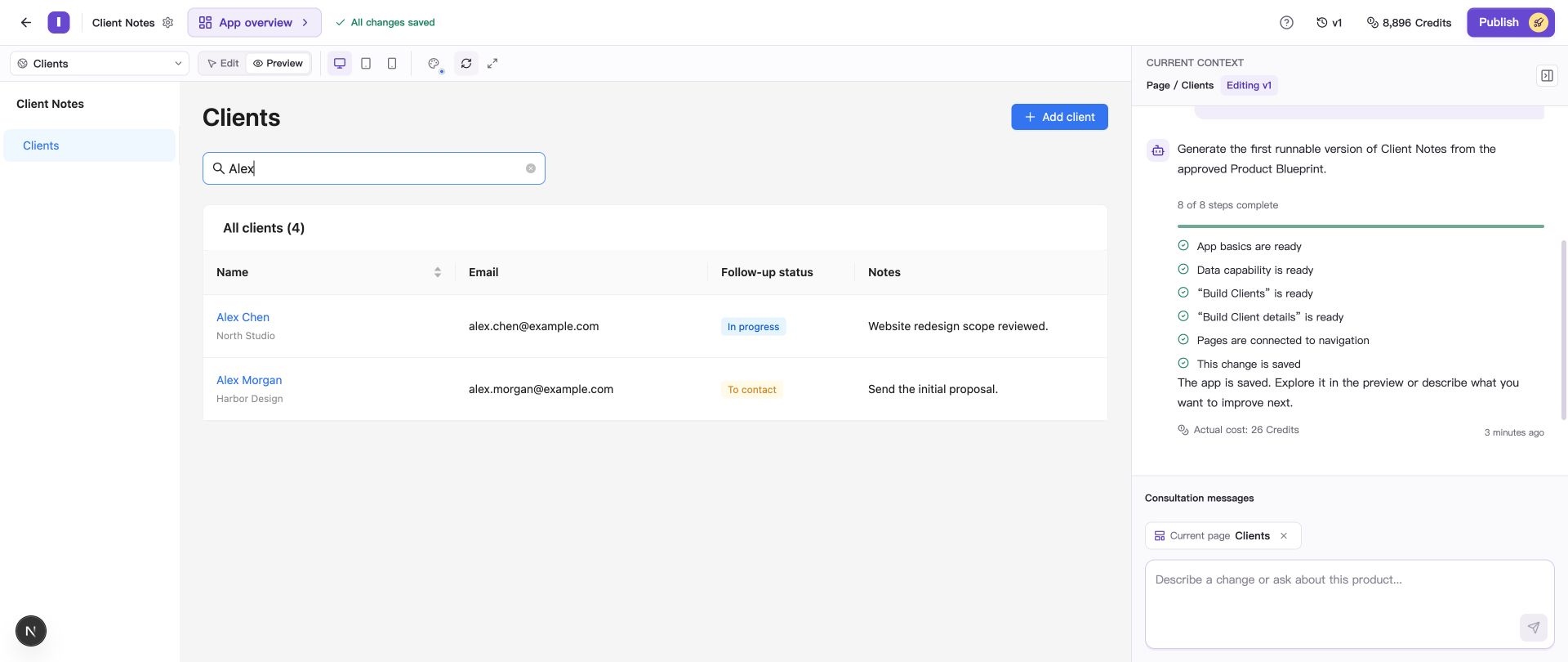
Searching for Alex in v1 finds two clients with different statuses.
We added these four clients:
| Client | Follow-up status |
|---|---|
| Alex Chen | In progress |
| Alex Morgan | To contact |
| Maya Patel | In progress |
| Taylor Reed | Won |
With this list, the expected results are easy to check. Searching for Alex should find two clients. Selecting In progress should also find two. Using both should find only Alex Chen.
Review the plan for the new filter
We asked Builder to add the status filter. Our request also explained what should happen when someone used it:
- Keep name search and let it work together with the status filter.
- Keep the existing clients, their details, alphabetical order, and the ability to add and edit clients.
- Keep the search text when switching the status filter back to All.
- Remember the search and selected status when returning from client details, and show any saved changes.
- Show a clear message when no clients match.
IdeaMade produced a change plan. We opened View full changes to see what it proposed for the Clients page and the way people search for a client.
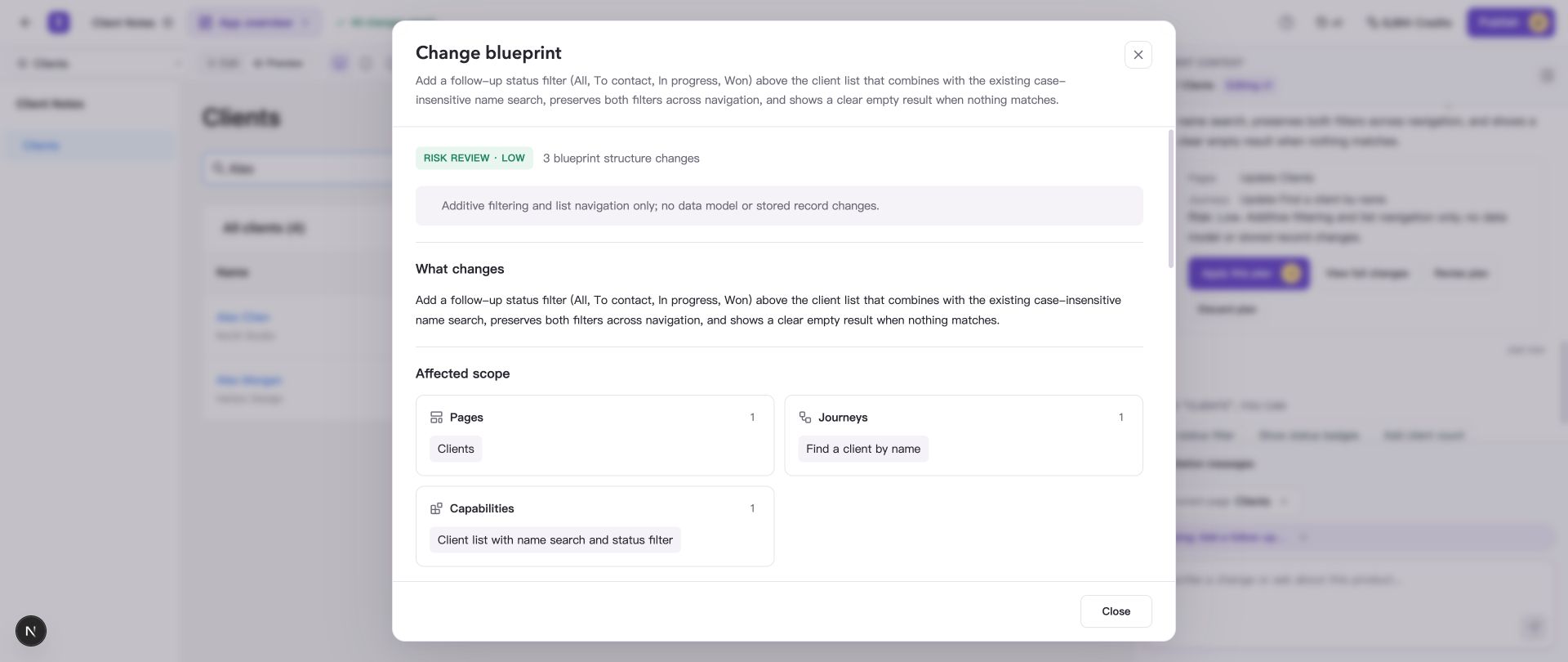
The plan includes using the new status filter together with name search.
The plan also listed things to check afterward. Would the list stay in alphabetical order? Would switching to All keep the search text? Would the selected filters still be there after opening a client and returning?
The plan made AI’s understanding visible before we applied it. Its expected results were then included in the coding task. Builder saved the updated app as v2.
The help guide to reviewing and applying change plans explains where to view a plan and how to ask for changes before applying it.
Try the new feature alongside the old ones
Once the updated app was ready in Preview, we tried the same actions someone would use to find and update a client.
First, we searched for Alex and selected In progress. Only Alex Chen appeared. We then tried the reverse order: select In progress, then search for Alex. The result was the same. Typing “aLeX” also found Alex Chen.
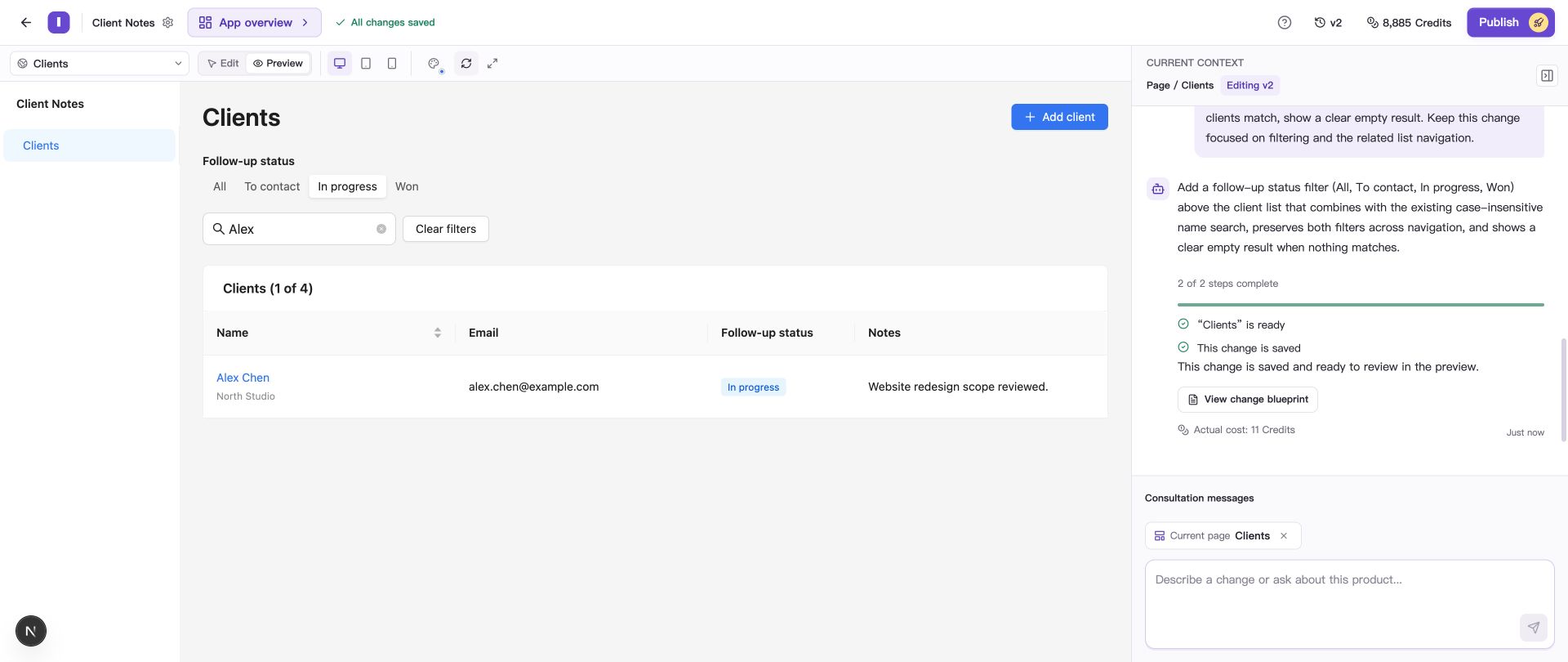
Searching for Alex and selecting In progress shows only Alex Chen.
Next, we edited that client:
- Open Alex Chen from the results.
- Change the status from In progress to Won.
- Update the note and save.
- Return to the client list.
The search box still contained “Alex,” and In progress was still selected. This time, no clients appeared. That was correct: Alex Chen was now Won, while Alex Morgan was still To contact. Neither matched both filters.
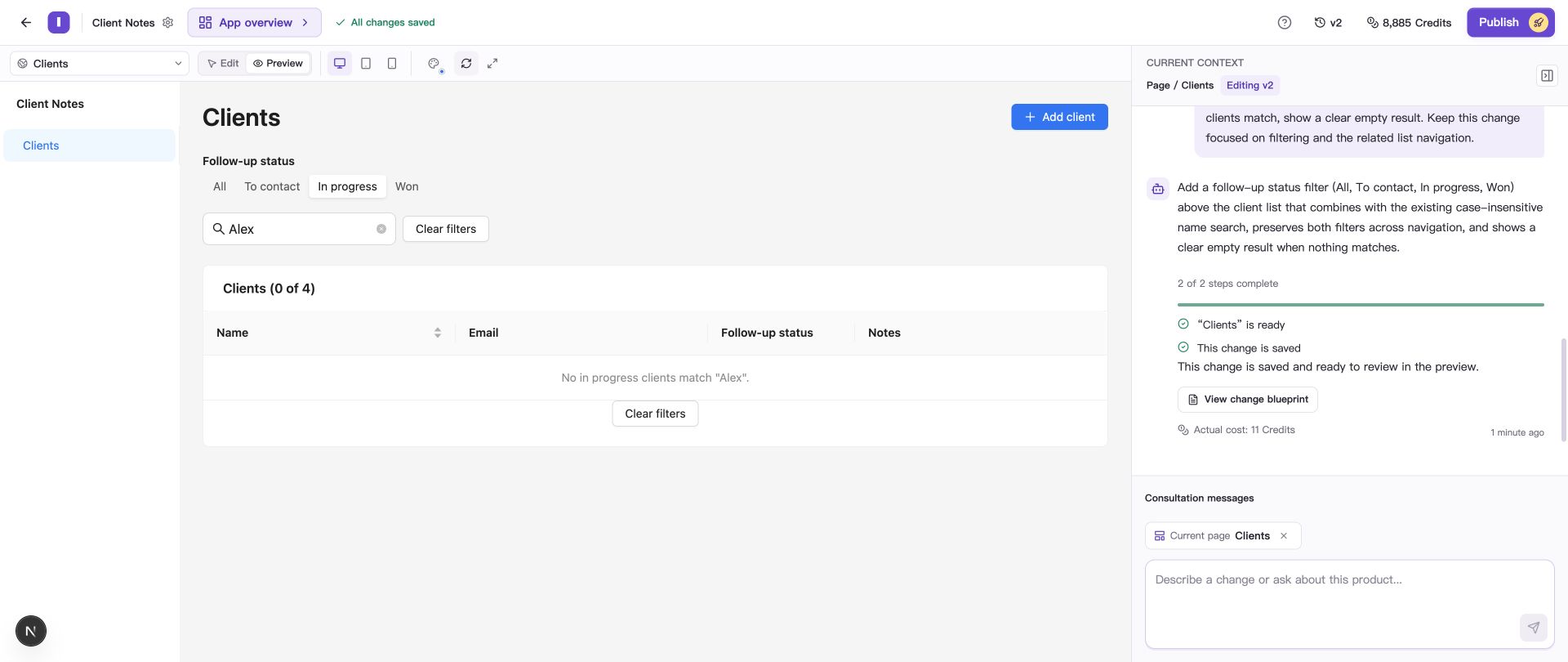
Alex Chen no longer appears under In progress after we save the new status.
We then switched the status filter to All. “Alex” stayed in the search box, and both clients appeared again. Alex Chen showed Won and the updated note. After refreshing Preview, the search, results, and saved details were still there.
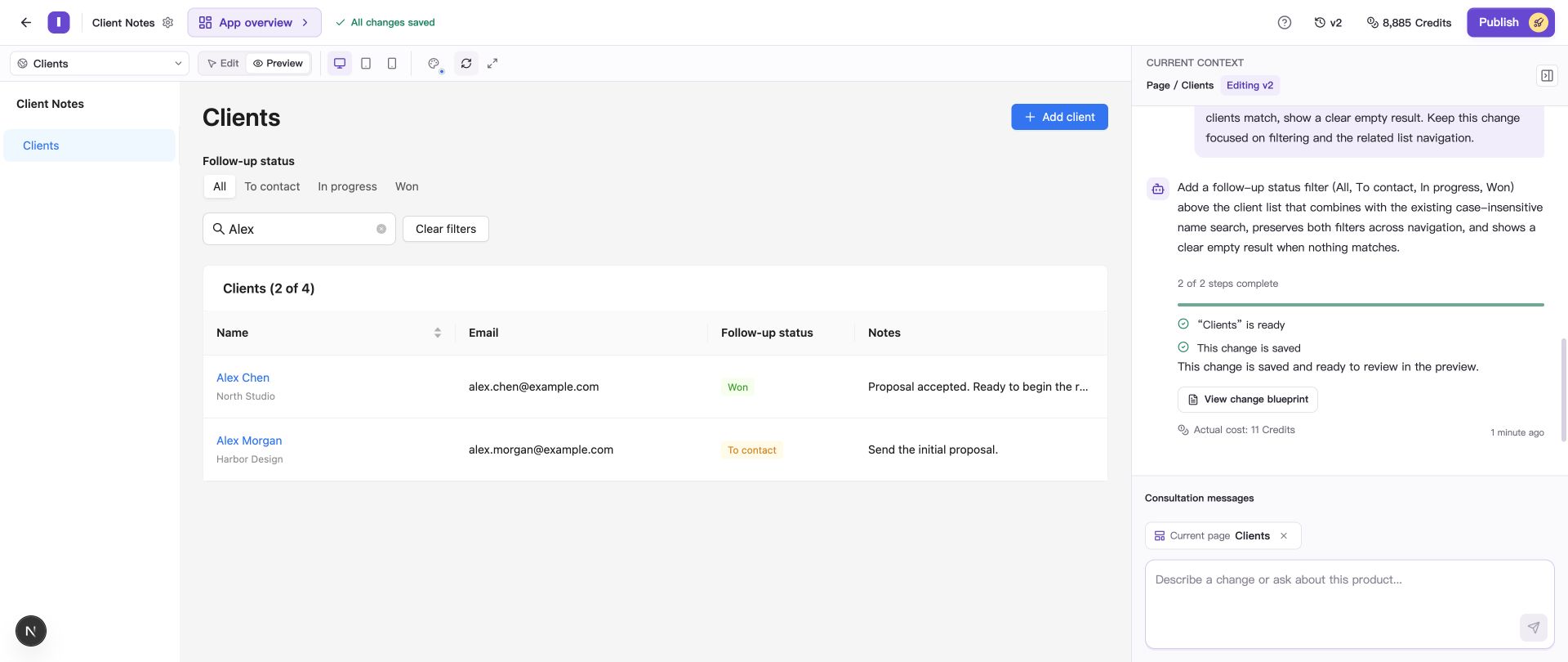
Selecting All brings both Alex clients back without clearing the name search.
We also tried every status option and added a fifth client. After refreshing, all five clients were still saved and appeared in alphabetical order.
These checks answered the questions we started with: does name search still work, can we use both filters together, and can we still add and edit clients? In this update, all three worked.
If something breaks, describe the steps that show it
A useful follow-up request tells AI what you did, what happened, and what you expected.
For example, if selecting a status caused the app to ignore the name search, you could write:
When I search for Alex and then select “In progress,” clients with other names appear. I expect to see only clients named Alex whose status is In progress. Keep the existing client records and alphabetical order.
That gives AI a specific problem to investigate. After the fix, you can repeat those steps and see whether the result is right.
“Fix the filters” gives less information. AI has to work out whether the problem is missing clients, incorrect results, a button that does nothing, or something else. Describing what happened helps it focus on the problem you actually saw.
You can also look back at earlier versions. Our project kept v1 alongside the updated v2. The version history guide explains how to view earlier work and restore an editing version.
Keep the features you already rely on
When you ask AI to add something, you usually expect the rest of the app to keep working. Problems arise when AI misses that expectation, uses an outdated description, or overlooks how the new feature affects an existing one.
IdeaMade addresses this by giving AI the current requirements and app information, keeping requirement entries that the change does not touch, and passing the reviewed plan into the coding task. Saving the updated Blueprint with the new version also gives the next change an up-to-date starting point.
In Client Notes, that process produced a filter we could use alongside name search. We then tried it in Preview, edited a client, and returned to the list to check the result.
As an app grows, there are more existing features to account for. Our article on why AI-generated apps become difficult to maintain explores that problem further.
For your next update, describe what you want to add and the existing features it needs to work with. Review the plan, then try those features together in Preview before publishing. If you are starting from scratch, our guide to turning an idea into an app without coding walks through creating the first version.